
Auto Capture Triggers
Configure your campaign to automatically capture authorized transactions based on a trigger event — for example, when a shipment receives tracking.
When using auth/capture flows, an order is first authorized — placing a hold on the customer's card without collecting payment — and then later captured to actually collect the funds. The capture step can happen in a few different ways: you can call it manually whenever you're ready, you can schedule it for a specific time via the API, or you can let Vrio handle it for you with an Auto Capture Trigger.
Auto Capture Triggers are rules that capture authorized transactions automatically based on an event — without you needing to make a manual capture call or schedule a date. The trigger watches for the event you select and fires the capture as soon as it happens, so payment collection stays tied to whatever business condition matters most to you (for example, a shipment going out the door).
Today, Vrio supports one trigger type:
- On Shipment Shipped — captures the authorization when a shipment on the order receives a tracking number.
Regardless of which trigger type is configured, an authorization can always be captured manually before the trigger fires — either from the customer view UI or via the API. See Capturing Without a Trigger below.
Auth vs. Sale
Setting an Auto Capture Trigger does not change how orders are processed — it does not force orders into the auth-capture flow. The trigger only applies when an order is actually processed as an authorization. If the same order is processed as a regular sale, the sale charges immediately and the trigger has no effect — there is nothing to capture later.
Whether an order is processed as an auth or a sale is decided at the time of processing (for example, by passing
action: "authorize"via the API). The Auto Capture Trigger setting is what determines what happens after an auth is processed, not whether an auth is processed in the first place.
Subscription Lifecycle
When Auto Capture on Recurring is enabled, the auth-capture flow becomes the subscription's billing mechanism — not just a one-time payment pattern. Understanding how the lifecycle works helps clarify why each piece exists and what controls the cadence.
Cycle 1: Capture Starts the Subscription
The initial authorization is just a hold — it verifies the customer's payment method and reserves funds, but the subscription is not active yet. The order can still be modified, upsold, or re-authorized before capture.
When the first capture is processed successfully, the subscription activates: the order is marked complete, the order offer becomes active, and the first recurring transaction (cycle 2) is created. This is the moment the subscription begins.
Cycle 2+: Auth Renews the Subscription
Once the subscription is active, each successful recurring authorization creates the next cycle's transaction. The auth is the billing event — it confirms the customer's payment method is still valid and reserves funds for the current cycle.
Whether that next transaction is immediately scheduled or waits for capture depends on the Schedule on Capture setting (see below).
The Pending State
Once a subscription is active, there is always a next transaction in the system — this is how recurring billing works. The system needs something to act on for the next cycle. That transaction might have a scheduled date (ready to fire when the date arrives) or it might be in a pending state with no date, waiting for a trigger to activate it.
A pending transaction can always be given a date manually — either from the customer view UI or via the API — if you want to override the automatic cadence.
Configuration
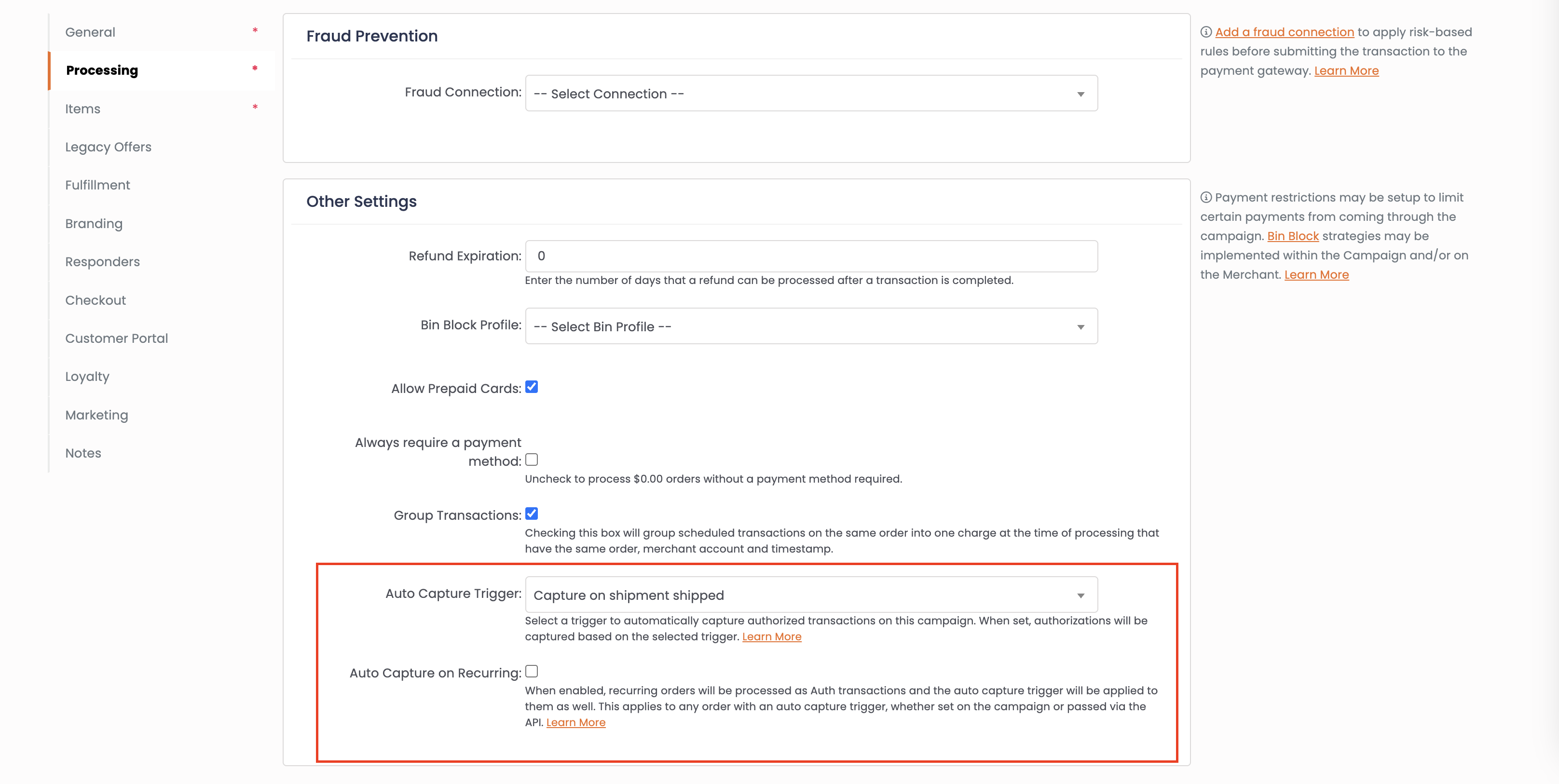
Auto Capture Triggers can be configured in two places:
-
On the campaign — Set the trigger on the Processing tab to apply Auto Capture to every order on the campaign that is processed as an authorization.
-
Per-order via the API — Pass
auto_capture_trigger_idon an individual order to override the campaign default.
API Override
You don't have to use the campaign setting for every order. The auto_capture_trigger_id field can be passed directly through the API when creating or updating an order:
- Enable per-order — Pass
auto_capture_trigger_id=1on an order to enable auto-capture even if the campaign doesn't have it configured. This is useful when only certain orders on a campaign need the auth-capture flow. - Disable per-order — Pass
auto_capture_trigger_id=0on an order to disable auto-capture even if the campaign has it enabled. The order will follow the normal sale flow.
If auto_capture_trigger_id is not passed in the API, the order inherits the campaign's setting automatically.
Auto Capture on Recurring
This checkbox controls how recurring cycles (cycle 2+) behave after a captured authorization. It applies regardless of which trigger type is used and regardless of whether the initial auth-capture was driven by the campaign setting or the API override — once an authorization has been captured, this setting determines what cycle 2+ looks like.
When enabled, recurring transactions following a captured authorization also process as authorizations. The same trigger applies — the recurring auth waits for its trigger event before the capture is processed. This creates a consistent auth-capture flow across all billing cycles.
When disabled, only the initial transaction (cycle 1) uses the auth-capture flow. All subsequent recurring cycles process as regular sales and are charged immediately.
If a recurring authorization is declined, it follows the same dunning flow as a declined sale — the transaction type doesn't change how dunning works. Learn more: Dunning Profiles →
Choosing the Right Setting
Enable "Auto Capture on Recurring" if you want every billing cycle to wait for the trigger event before charging. This is ideal for subscription boxes or products where fulfillment timing matters for every shipment. Leave it disabled if you only need auth-capture for the initial order and want recurring cycles to charge immediately.
Schedule on Capture
This setting is available when Auto Capture on Recurring is enabled. It controls when the next recurring authorization gets its scheduled date.
When enabled, each successful recurring auth creates the next cycle's transaction in a pending state — no scheduled date. The transaction sits dormant until the current cycle's capture is attempted, at which point the system calculates the next billing date from the capture date and assigns it. This ties your billing cadence directly to when payment is actually collected rather than when authorization happened.
When disabled, each successful recurring auth creates the next cycle's transaction with a scheduled date immediately. The billing cadence is calculated from the auth date regardless of when capture happens.
Why Use Schedule on Capture?
Consider a subscription that bills every 30 days. Without Schedule on Capture, the next auth is scheduled 30 days from when the current auth succeeded — even if the capture doesn't happen for several days after that. Over time, customers end up being authorized well before their previous order has actually been charged.
With Schedule on Capture, the 30-day clock starts when the capture fires. If capture happens 3 days after auth (because it took that long for the shipment to get tracking), the next auth is 30 days from the capture date. The billing cadence reflects when customers are actually charged, not when their cards are verified.
On Shipment Shipped
The On Shipment Shipped trigger captures the authorization when a shipment on the order receives a tracking number. This trigger ties payment collection to fulfillment — customers are only charged once their order has actually shipped.
This is useful for businesses that want to verify fulfillment before collecting funds, reduce chargebacks from unfulfilled orders, or comply with payment regulations that require shipment before charge.
When setting this trigger on an order via the API, pass auto_capture_trigger_id=1.
How It Works
Standard Auth Flow (Without a Trigger)
- Customer places an order as an authorization
- Payment is authorized — funds are held on the customer's card but not collected. No shipment is created yet.
- The capture is processed (manually, via the API, or via a scheduled
date_auto_capture) - On successful capture, the shipment is created and sent to fulfillment
Auth with On Shipment Shipped Flow
- Customer places an order as an authorization
- Payment is authorized — funds are held on the customer's card but not collected
- Shipment is created and sent to fulfillment
- Fulfillment ships the order and adds a tracking number
- The system detects tracking on the shipment and marks the order ready for capture
- The auto capture batch job runs and captures the authorization — funds are collected
Orders with Multiple Shipments
If an order has multiple shipments — for example, items routed to different fulfillment connections — the capture fires when the first shipment receives tracking. The system does not wait for every shipment to ship before capturing.
Shipments on Authorization
This trigger is unique among Auto Capture Triggers in that shipments are created when the authorization is processed, before payment is collected. In every other capture flow — including a regular sale, a capture, or any future trigger that doesn't depend on shipment events — shipments are created at the time payment is collected.
This means your fulfillment provider receives the order and begins packing and shipping while the customer's payment is still only a hold. Once the shipment receives tracking, the system captures the authorization and collects payment.
Fulfillment Before Payment
Because shipments go out before the capture, there is a risk that the capture could fail after the product has already shipped (for example, if the customer's card expires between the auth and capture). Make sure your business model and return policy account for this possibility. See Failed Captures below for how the system handles this scenario.
Voiding and Re-Authorization
Automatic Voiding on Re-Auth
When using the On Shipment Shipped trigger, if a new authorization is processed on an order that already has an uncaptured authorization, the system automatically cleans up the previous state:
- All previous uncaptured authorizations are voided — the holds are released
- All shipments tied to those voided authorizations are cancelled
- New shipments are created for the new authorization
This ensures there is only one active authorization at a time and prevents duplicate shipments from going to fulfillment.
How this differs from the standard auth/capture flow
In the standard auth/capture flow (no trigger), previous authorizations are not voided when a new auth is processed — they stay in place until capture, at which point only the most recent successful auth is captured and the rest are voided. With On Shipment Shipped, the void has to happen immediately on re-auth because shipments have already been scheduled against the prior auth. Leaving those shipments in place would risk duplicate orders going out to the customer.
This is particularly important for upsell flows — when a customer accepts an upsell, a new authorization is created at the higher amount. The previous authorization and its shipments are automatically cleaned up.
Learn more: Single Order Upsell Processing →
Re-Auth Restrictions
You cannot re-authorize an order if shipments have already passed their scheduled fulfillment date. At that point, the original shipments may already be in transit — creating new ones would risk sending duplicate orders to the customer.
To give yourself a window where re-authorization is still safe, set a fulfillment delay on the offer. The delay sets how long shipments wait before being sent to fulfillment, so any re-auths that happen within that window automatically clean up and recreate the shipments before they go out. This is especially important for upsell flows, where the order amount may change after the initial auth.
Learn more: Fulfillment Delays →
If you need to make changes after shipments have gone out, void the existing authorization first (which cancels its shipments), then create a new authorization.
Failed Captures
How a failed capture is handled depends on which cycle it occurs on.
Cycle 1 (Initial Order)
A failed capture on the initial order means the subscription has not started yet — the authorization placed a hold, but payment was never collected. The order stays in its current state:
- The order offer remains Pending
- The order is not marked as complete
- No recurring cycle is created
The Capture button remains available on the authorization in the customer view, and you can call POST /orders/{order_id}/capture to retry via the API. Once a capture attempt succeeds, the subscription activates and the first recurring cycle is created.
Cycle 2+ (Recurring)
When Auto Capture on Recurring is enabled, the recurring authorization already scheduled the next cycle when it succeeded — the capture's job is only to collect payment. A failed capture does not affect the subscription lifecycle:
- The order offer remains Active
- The next recurring cycle is already scheduled (it was created when the auth succeeded)
- The failed capture is a payment-collection issue to retry separately
The Capture button remains available for reattempting. If the reattempt also fails, no additional recurring cycles are scheduled — the next cycle was already created by the auth.
When Schedule on Capture is enabled, the next cycle's date is set on the first capture attempt — regardless of whether that attempt succeeds or fails. This maintains a consistent billing cadence even when captures need to be retried.
What You'll See in the UI
When an authorization has a declined capture:
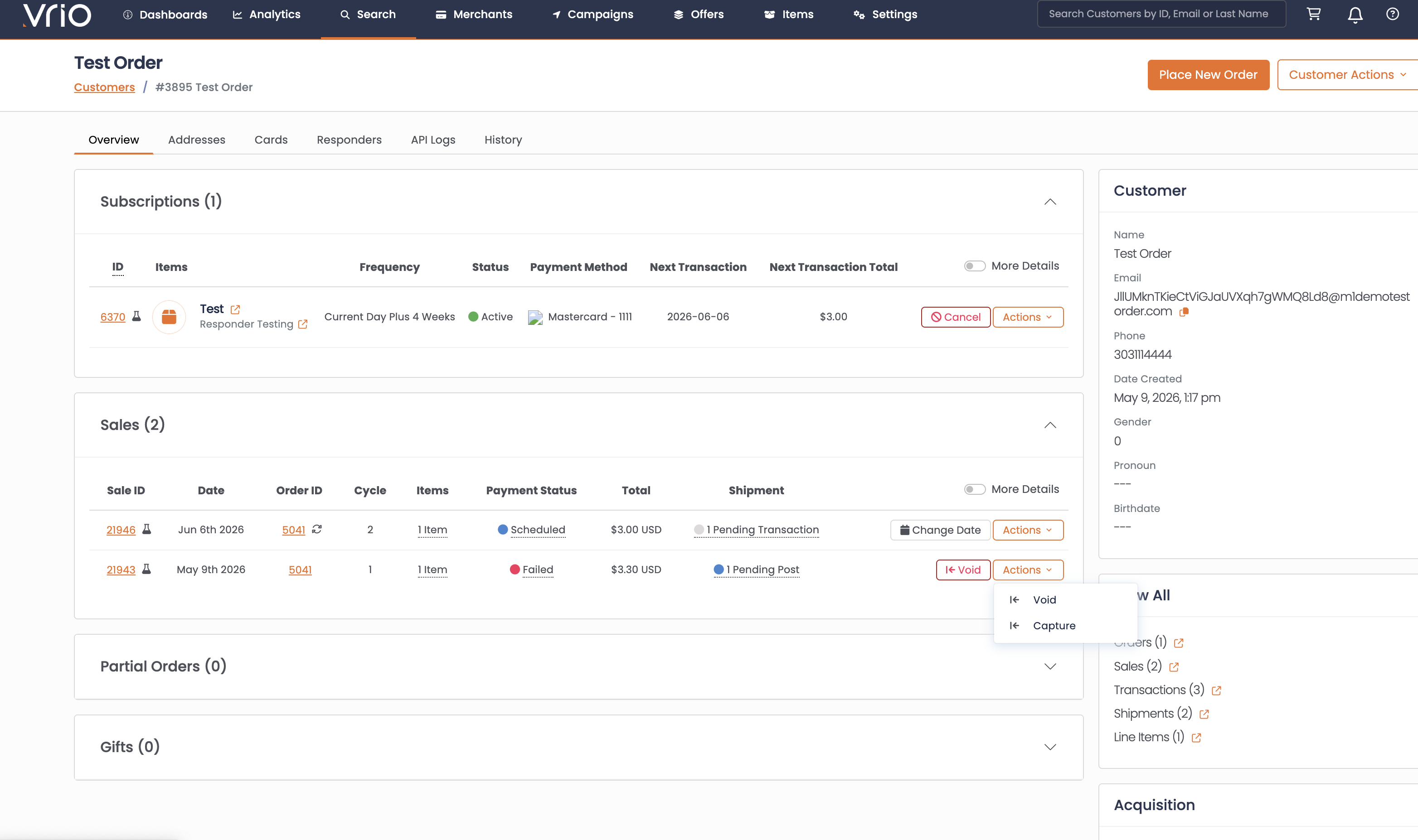
- The transaction row shows a Failed status with a red indicator
- The Capture action button is still available for reattempting
- On recurring cycles, the next authorization appears as scheduled in the subscription
Capturing Without a Trigger
You don't have to use a trigger to capture an authorization. Captures can also be processed manually or scheduled directly via the API. See Ways to Capture an Authorization for the manual and API-scheduled paths.
Important Notes
- The merchant account must be active at the time of capture for it to process successfully.
- Voiding an authorization releases the hold on funds and cancels its shipments. If a shipment has not yet been sent to the fulfillment connection, the cancel is processed on Vrio's end. If it has already been sent, Vrio attempts to cancel it at the fulfillment connection — but cancellation success depends on the connection and is not always guaranteed. A new authorization must be created if you still need to collect payment.
- If an order is cancelled after authorization but before capture, the batch may still capture the transaction (since the shipment was already sent with tracking), but no further recurring cycles will be scheduled.
Related Documentation
- Auth & Capture — Authorization lifecycle, API endpoints, and all the ways to capture
- Single Order Upsell Processing — Auth-then-capture pattern for upsell flows
- Dunning Profiles — Configure retry logic for declined transactions
- Processing Settings — Campaign payment processing configuration
Updated 4 months ago