
Update Campaigns
Bulk update campaign settings using CSV file import.
Update multiple campaign records at once by uploading a CSV file. This is useful for bulk updating campaign settings, responders, or connection assignments across multiple campaigns.
Key Takeaways
- Updates existing campaign records only
- The
Campaign IDfield is required to identify records- Only include columns for fields you want to update
- Download the template to ensure correct column headers
Template
Required Fields
| Field | Description |
|---|---|
Campaign ID | The ID of the campaign to update |
Include additional columns only for the fields you want to change.
Editable Fields
| CSV Header | Description |
|---|---|
| Campaign ID | Required - ID of the campaign to update |
| Name | Campaign name |
| Payment Type | 1 = Router, 2 = Merchant |
| Payment Route | Payment route ID (required when Payment Type = 1) |
| Merchant Account | Merchant ID for processing (required when Payment Type = 2) |
| Active | 1 = active, 0 = inactive |
| Fulfillment Connection | Fulfillment connection ID |
| Shipping Profiles | Shipping profile IDs (comma-separated for multiple) |
| Apply Shipping to renewals | 1 = apply shipping to renewals |
| Restrict Countries to Shipping Profile | 1 = restrict countries |
| Allow Prepaid Cards | 1 = allow, 0 = block prepaid cards |
| Always require a payment method | 1 = require payment method |
| Refund Expiration | Days until refund expires |
| Bin Block Profile | BIN block profile ID |
| Fraud Connection | Fraud detection connection ID |
| Address Validation Connection | Address validation connection ID |
| Tax Connection | Tax calculation connection ID |
| Tax Profile | Tax profile ID |
| Order Responder | Order responder ID |
| Group Order Responders | 1 = group order responders |
| Order Auth Responder | Order auth responder ID |
| Shipped Responder | Shipped notification responder ID |
| Delivered Responder | Delivery notification responder ID |
| Shipment Address Updated Responder | Address update responder ID |
| Void Responder | Void notification responder ID |
| Refund Responder | Refund notification responder ID |
| RMA Responder | RMA responder ID |
| Return Responder | Return responder ID |
| Partial Responder Schedule | Partial responder schedule ID |
| CPA | Cost per acquisition |
| Pixel Type | Pixel type ID |
| Pixel | Pixel/tracking code block |
| Abandoned Delay | Hours before marking order abandoned |
| Checkout Confimation Location | Checkout confirmation redirect URL |
| Reward Profiles | Reward profile IDs (comma-separated for multiple) |
To Update Campaigns
-
Navigate to Campaigns
-
Click the Bulk Update button

-
Download the template and fill in your data
-
Upload your CSV file
-
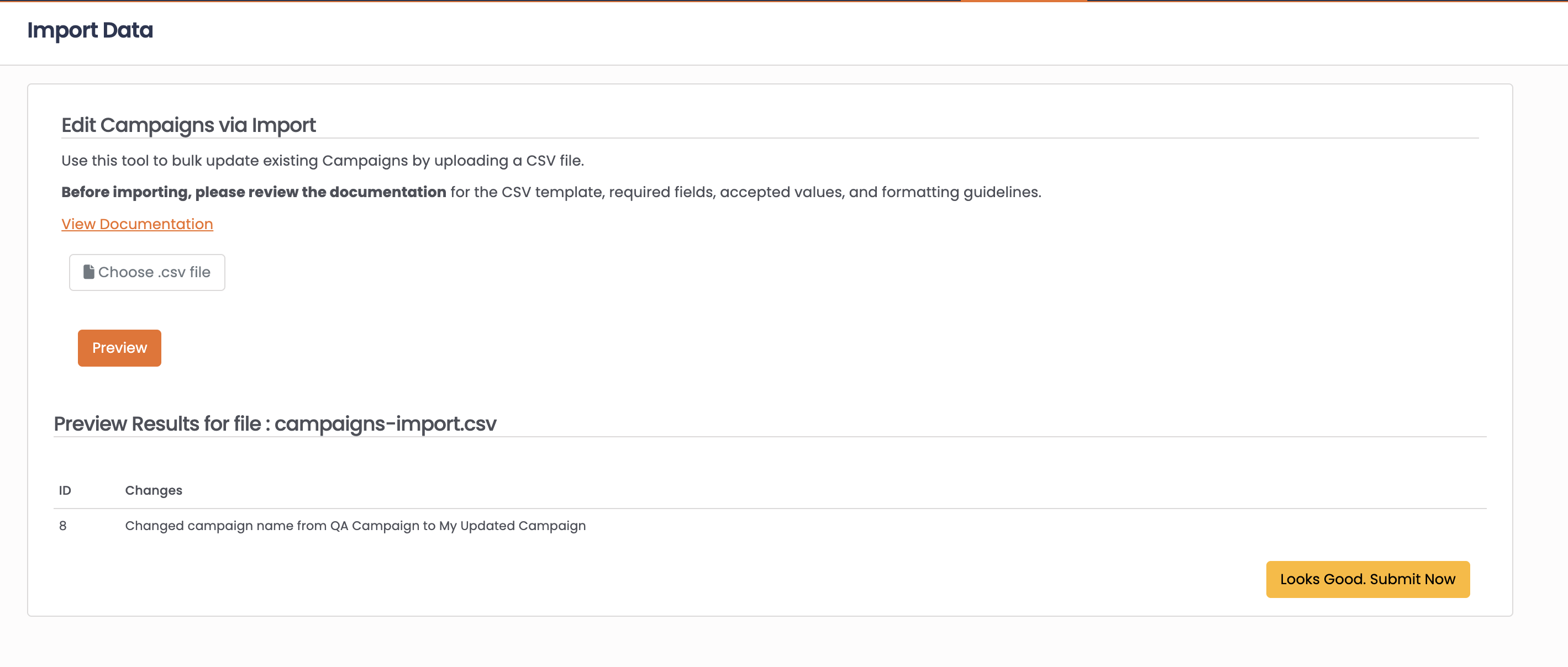
Click Preview to review the changes
-
Click Looks Good Submit Now to apply updates
Common Use Cases
Bulk update merchant assignments:
Use Campaign ID and Merchant Account to reassign campaigns to different merchants.
Update responders across campaigns:
Change notification responders in bulk by including the responder ID columns.
Update shipping profiles:
Use Shipping Profiles column with comma-separated profile IDs to assign multiple shipping profiles.
FAQ
Q: How do I find campaign IDs?
A: Campaign IDs are displayed in the Campaigns list and on individual campaign records.
Q: Can I create new campaigns via import?
A: No, campaign import only updates existing records. New campaigns must be created through the Campaigns interface.
Q: How do I assign multiple shipping profiles?
A: Use comma-separated IDs in the Shipping Profiles column (e.g., 1,2,3).
Updated 8 months ago