
Deleting Customers
Bulk delete customer records and all associated data. This action is permanent and cannot be undone.
Bulk delete customer records from Vrio. This permanently removes the customer and all associated data including orders, addresses, and payment methods.
Permanent DeletionDeleting customers is permanent and cannot be undone. All associated orders, addresses, payment cards, and other data will be permanently removed. Be absolutely certain before proceeding.
To Delete Customers
-
Navigate to Search
-
Select the Customers tab
-
Click Filters to narrow down the customers you want to delete
-
Add filters to find the customers you want to delete
-
Click Apply
-
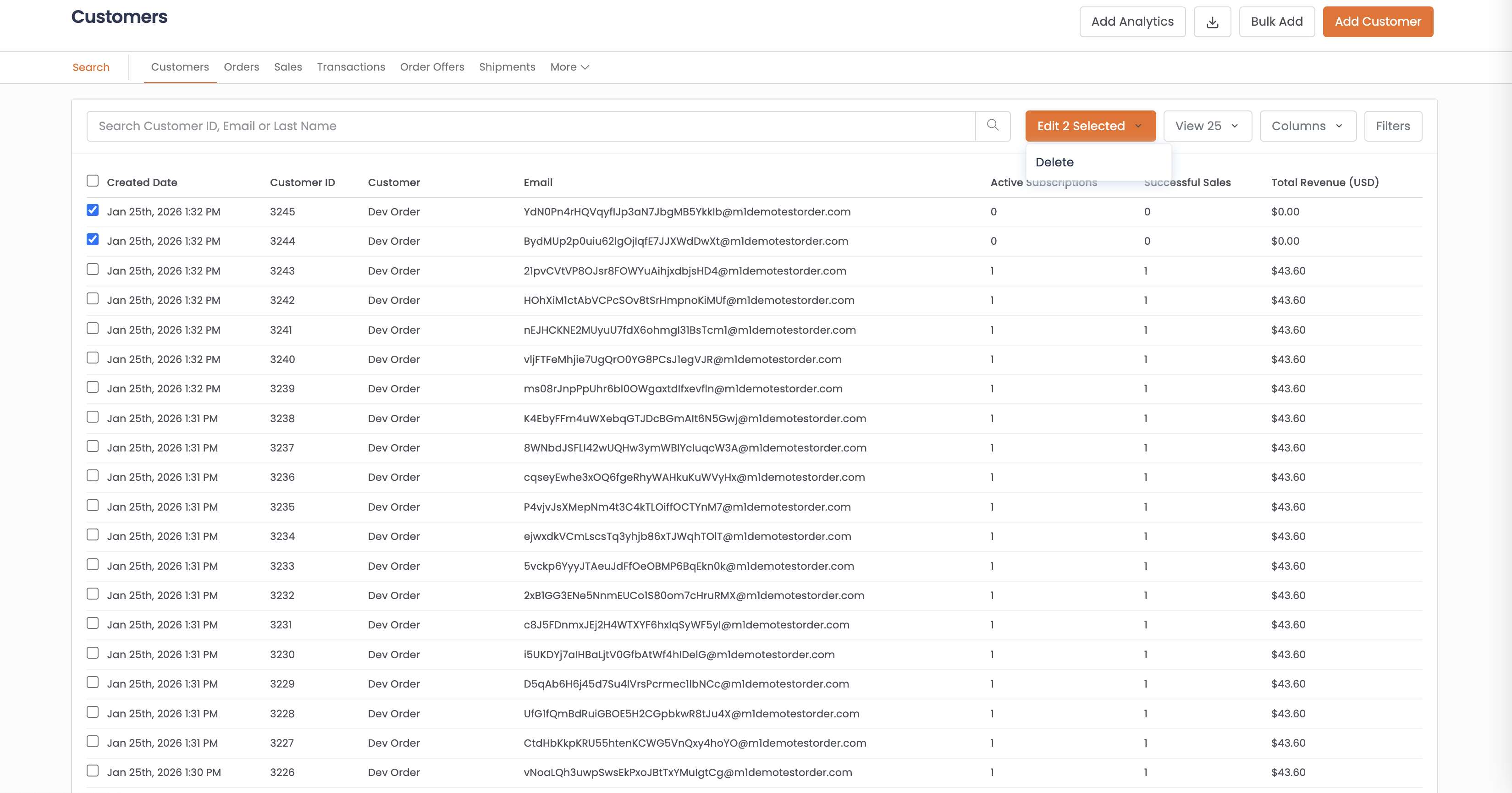
Select the checkboxes next to the customers you want to delete, or use the Select All checkbox
-
Click the Edit X Selected dropdown button
-
Select Delete
View By LimitBy default, search displays 25 records. You can expand this to 200 maximum. Bulk delete only affects customers visible in the current view. For more customers, run multiple passes.
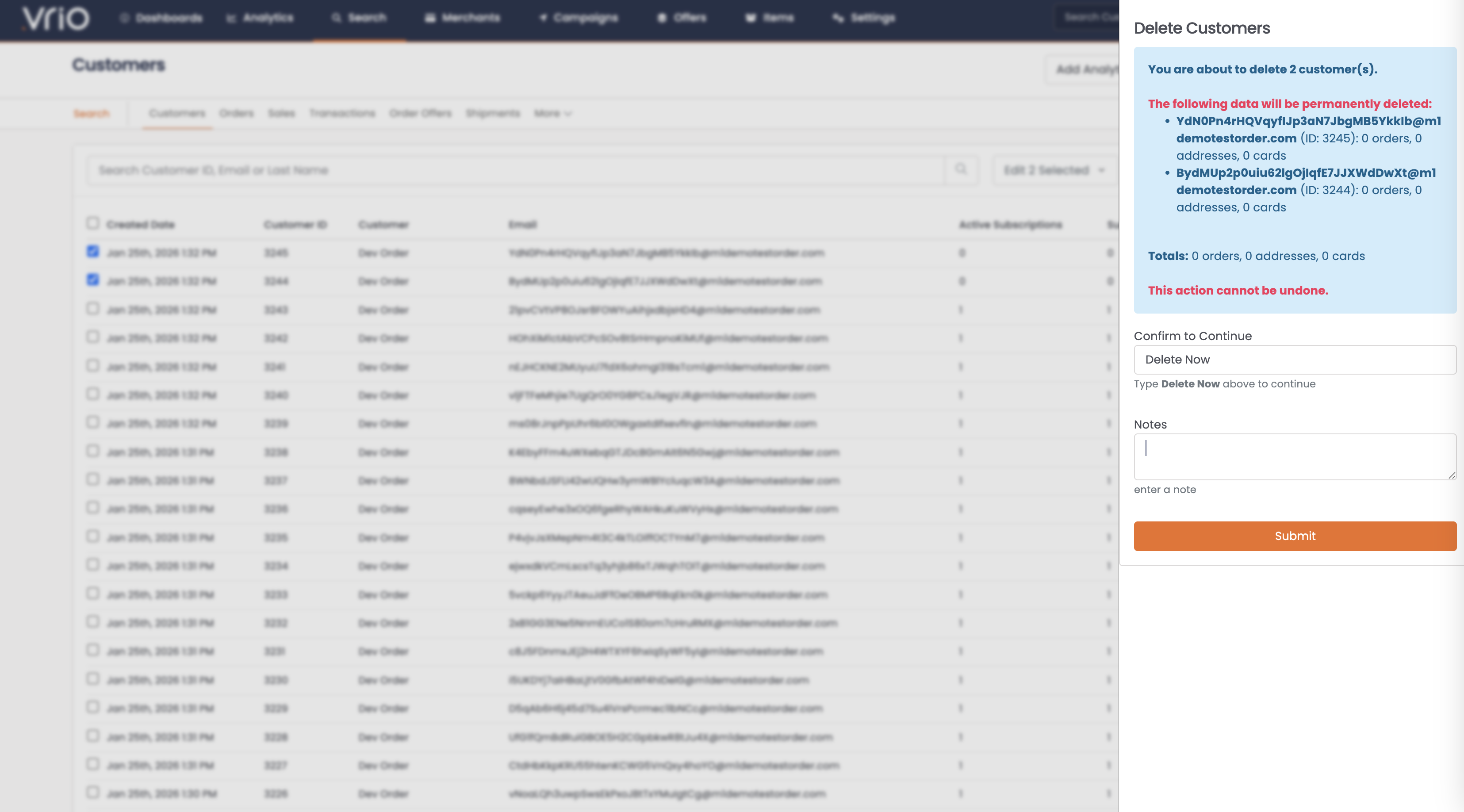
- In the Delete Customers modal, review the information:
- Customers to delete: Lists each customer's email and ID
- Associated data: Shows the number of orders, addresses, and cards for each customer
- Totals: Summary of all data that will be deleted
ImportantReview the list carefully. The modal shows exactly which customers and how much associated data will be permanently removed.
-
Type Delete Now in the confirmation field
-
Optionally add notes explaining the reason for deletion
-
Click Submit
After Deletion
Once submitted, the deletion processes and you'll see a Bulk Update results page showing:
- Status: Completed or any errors
- Records: Each deleted customer with a success or failure message
- Date: When the deletion completed
A success notification will appear confirming the customers were deleted.
What Gets Deleted
When you delete a customer, the following associated data is also permanently removed:
| Data Type | Deleted |
|---|---|
| Orders | All orders placed by the customer |
| Subscriptions | All active and cancelled subscriptions |
| Transactions | All transaction history |
| Shipments | All shipment records |
| Addresses | All saved addresses |
| Payment Cards | All saved payment methods |
| Notes | All notes on the customer record |
FAQ
Q: Can deleted customers be recovered?
A: No, once customers are deleted, the records are permanently removed and cannot be recovered.
Q: What happens to reports that included deleted customers?
A: Historical reports may still show aggregated data, but individual customer details will no longer be accessible.
Q: Can I delete customers with active subscriptions?
A: Yes, but the active subscriptions will also be deleted. No further charges will occur, but no cancellation responders will be sent.
Q: Is there a way to archive customers instead of deleting?
A: You can use the Blacklist feature to prevent future orders from a customer while keeping their historical data intact.
Q: How do I delete more than 200 customers?
A: You'll need to run the delete operation multiple times, processing up to 200 customers per batch. Filter your search results and repeat until all desired customers are deleted.
Updated 8 months ago