
Shipping & Fulfillment Configuration
Configure sophisticated fulfillment models including prepaid shipping, fulfillment delays, and flexible delivery schedules.
This guide covers how to configure shipment fulfillment in your offers. While billing events trigger shipment creation in Vrio, you have complete flexibility over how many shipments are generated and when they're scheduled, giving you the ability to create sophisticated fulfillment models that match your operational needs.
From simple monthly shipments to complex prepaid models where customers pay once but receive multiple deliveries, this guide will help you understand and configure the shipping options that work best for your business.
Why Shipping Configuration Matters
Smart shipping configuration isn't just about getting items to customers - it's about:
- Improving cash flow with prepaid shipping models
- Matching customer expectations with predictable delivery schedules
- Preventing unnecessary shipments by delaying fulfillment in case customers call to cancel
Prepaid Shipping Models
Prepaid shipping lets customers pay once but receive multiple shipments over time. This is perfect for:
- Improving customer retention (they've already paid)
- Reducing payment processing fees
- Offering bulk discounts
- Seasonal or quarterly programs
How Prepaid Shipping Works
- Customer pays full amount upfront (e.g., $89.99)
- You configure multiple shipments (e.g., 3 monthly shipments)
- System automatically schedules all future shipments
- Customer receives items on schedule without additional charges
Configuration Example:
- Billing: One-time charge of $89.99
- Shipping: 3 shipments, one every 30 days
- Result: Customer pays once, receives monthly boxes for 3 months
For detailed prepaid configuration and advanced models, see: Prepaid Offers Guide
Fulfillment Delays
Fulfillment delays control when Vrio schedules shipments to post to your fulfillment connection. When you set a fulfillment delay (e.g., 24 hours), Vrio waits that amount of time after the successful charge before sending the shipment information to your fulfillment provider.
How it works:
- Customer's payment processes successfully
- Vrio holds the shipment for the specified delay period
- After the delay, Vrio automatically posts the shipment to your fulfillment connection
- Your fulfillment provider receives the order and ships the item
This buffer between payment and fulfillment posting provides several benefits:
Prevent Unnecessary Shipping Costs
Setting a 24-48 hour fulfillment delay gives customers a window to call and cancel before items ship. This prevents:
- Shipping costs on cancelled orders
- Return shipping expenses
- Lost inventory from cancelled shipments
- Customer service workload handling returns
Common scenarios where this helps:
- Customer calls within hours to cancel their order
- Payment issues discovered after initial authorization
- Customer realizes they ordered the wrong item
- Duplicate orders that need to be consolidated
Allow More Time for Shipment Combining
If you have the Combine Shipments setting enabled on your fulfillment connection, adding a fulfillment delay gives Vrio more time to group multiple shipments going to the same customer address into a single fulfillment order. Without a delay, shipments post quickly and may miss the combining window. With a delay, orders placed around the same time are more likely to be held together and combined before posting — reducing shipping costs and avoiding multiple packages arriving separately.
This is especially useful when:
- Customers place multiple orders in a short period
- Upsells or cross-sells create additional shipments on the same day
- You want to minimize the number of packages sent to the same address
When combining shipments, Vrio will combine any shipment that is either scheduled before or up to 6 hours in the future into a single fulfillment order. Setting a fulfillment delay increases the likelihood that shipments fall within this window.
Setting the Fulfillment Delay
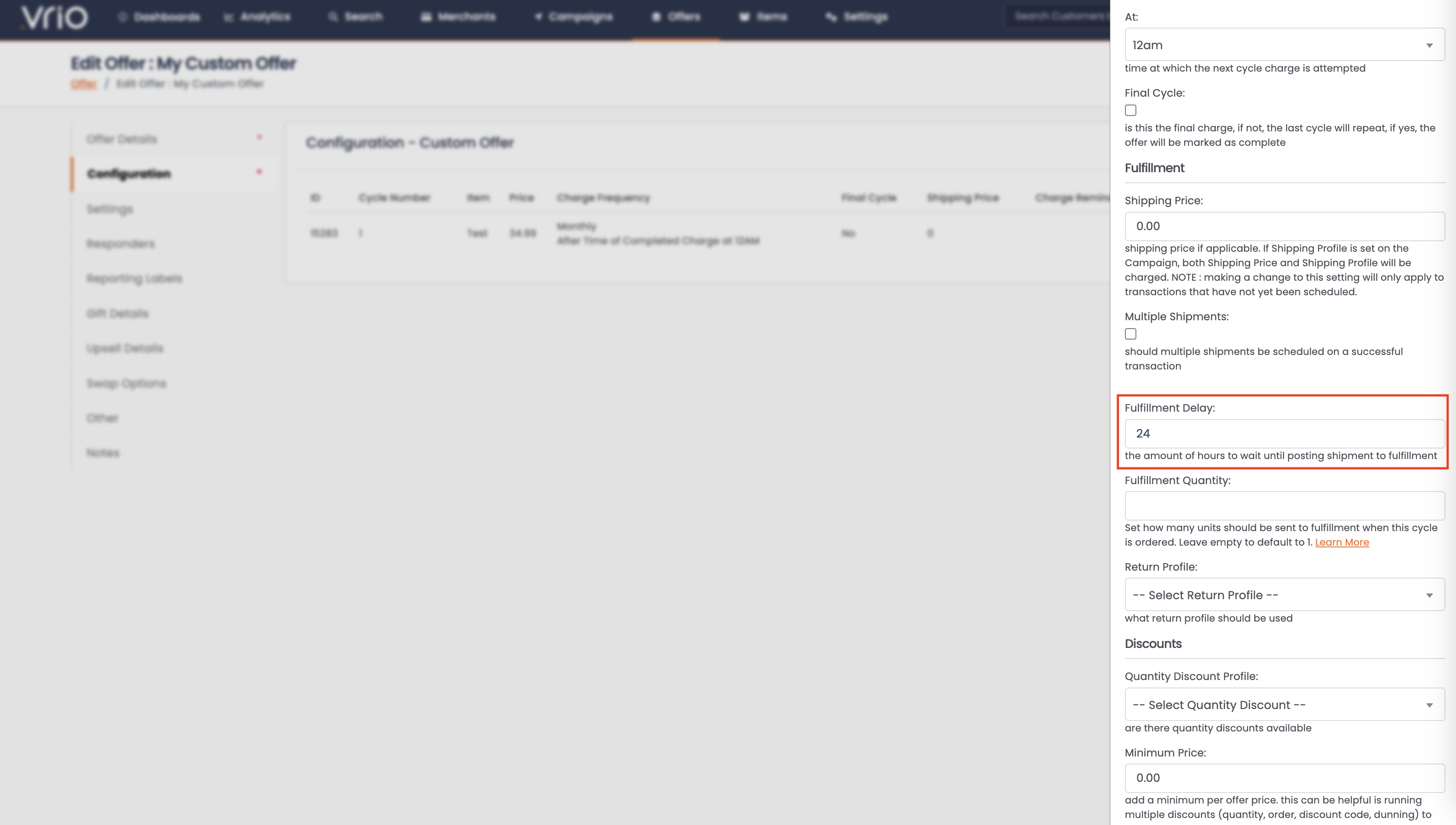
To set the fulfillment delay on a Custom Offer, open the offer and click on the cycle you want to edit. The fulfillment delay field is located in the Fulfillment section.
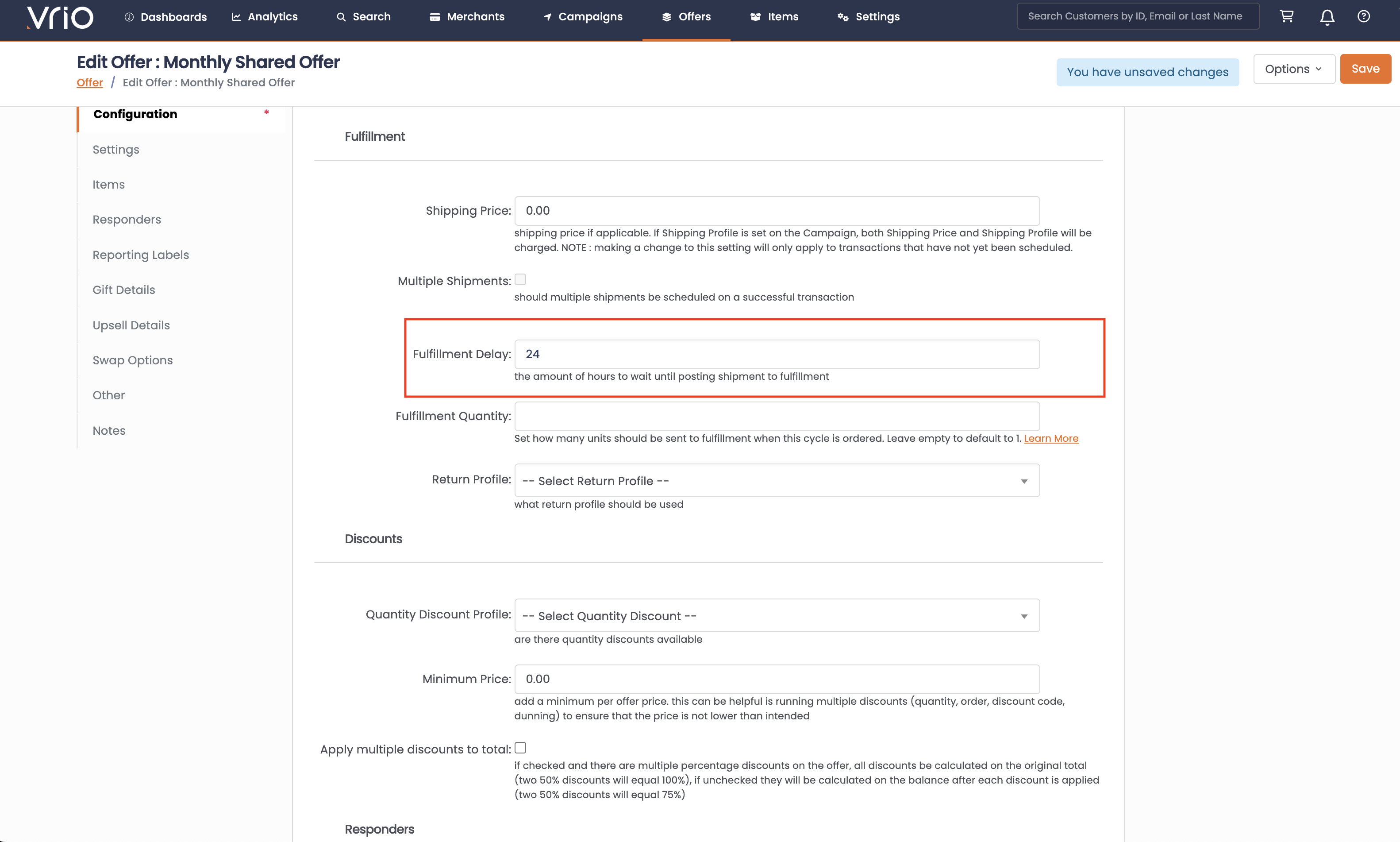
To set the fulfillment delay on a Shared Offer, open the offer and click on the Configuration tab to edit cycle-level settings including the fulfillment delay.
Configuration Best Practices
Recommended Delay Settings:
- Digital items: No delay needed
- Low-value items: 24 hours
- High-value items: 48-72 hours
- Custom/personalized items: 3-5 days
Fulfillment Quantity
The Fulfillment Quantity setting allows you to specify how many units of an item should be sent to fulfillment when a customer orders from a specific offer cycle. This gives you precise control over the quantity shipped, regardless of what appears as the "quantity" in the order.
How It Works
When a customer places an order, Vrio sends shipment details to your fulfillment connection. By default, each order sends a quantity of 1 to fulfillment. With the Fulfillment Quantity setting, you can override this to send any quantity you specify.
Default behavior:
- Customer orders 1 subscription → Fulfillment receives order for 1 unit
With Fulfillment Quantity set to 3:
- Customer orders 1 subscription → Fulfillment receives order for 3 units
When to Use Fulfillment Quantity
This feature is valuable for several business models:
Multi-pack subscriptions
- Customer subscribes to a monthly vitamin program
- Each month they should receive 3 bottles (90-day supply)
- Set Fulfillment Quantity to 3 on the offer cycle
Bulk fulfillment programs
- Selling wholesale or bulk quantities through subscription
- Customer pays for "1 subscription" but receives multiple units
- Set Fulfillment Quantity to match your bulk quantity
Promotional bundles
- "Subscribe and get 2 for the price of 1" promotions
- Customer sees 1 item in cart but receives 2 units
- Set Fulfillment Quantity to 2
Sample programs
- First cycle sends 2 sample sizes, renewals send 1 full size
- Cycle 1 Fulfillment Quantity: 2
- Cycle 2+ Fulfillment Quantity: 1
Configuration
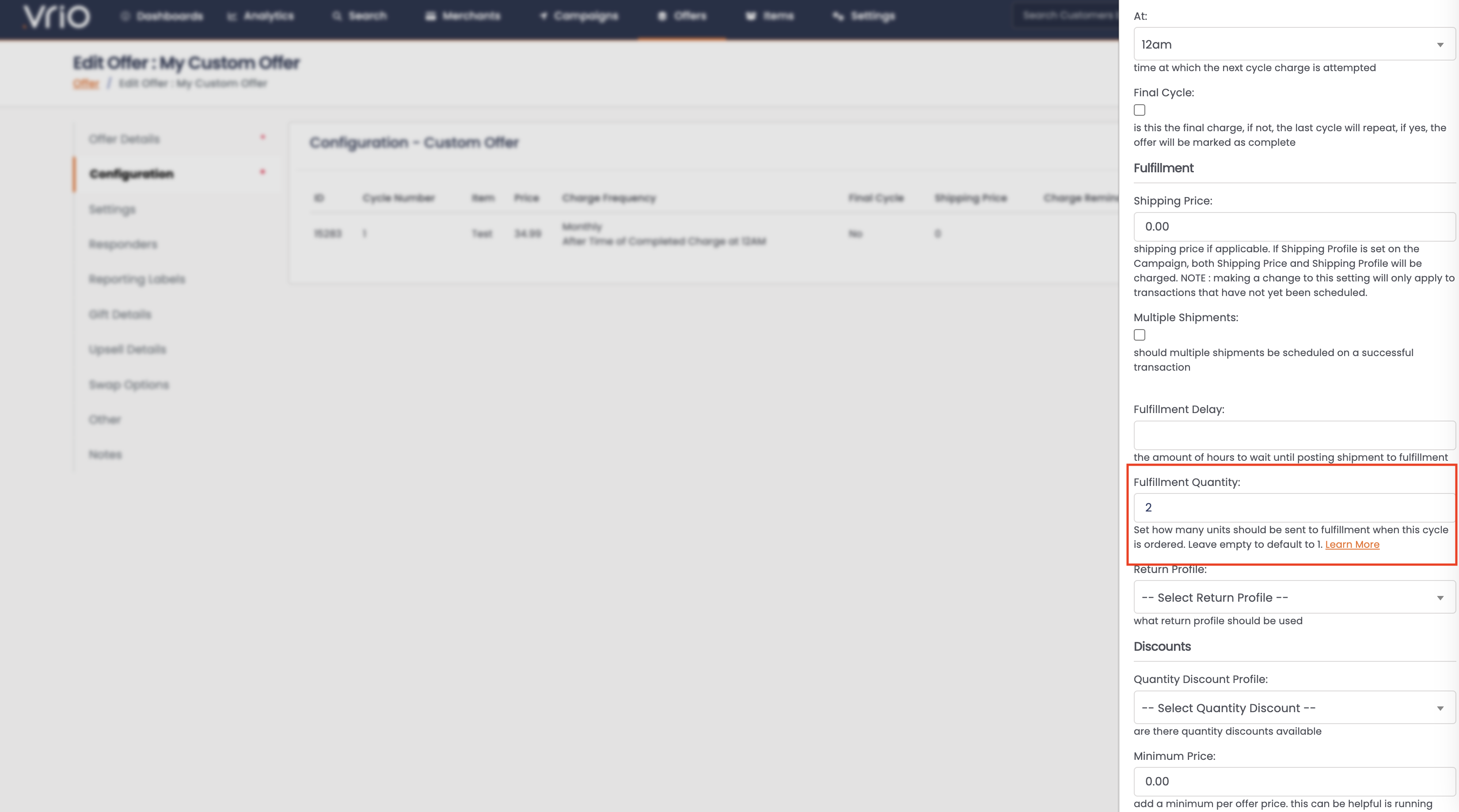
To set the fulfillment quantity on a Custom Offer, open the offer and click on the cycle you want to edit. Navigate to the Fulfillment section and enter the desired quantity in the Fulfillment Quantity field. If left empty, the system defaults to 1.
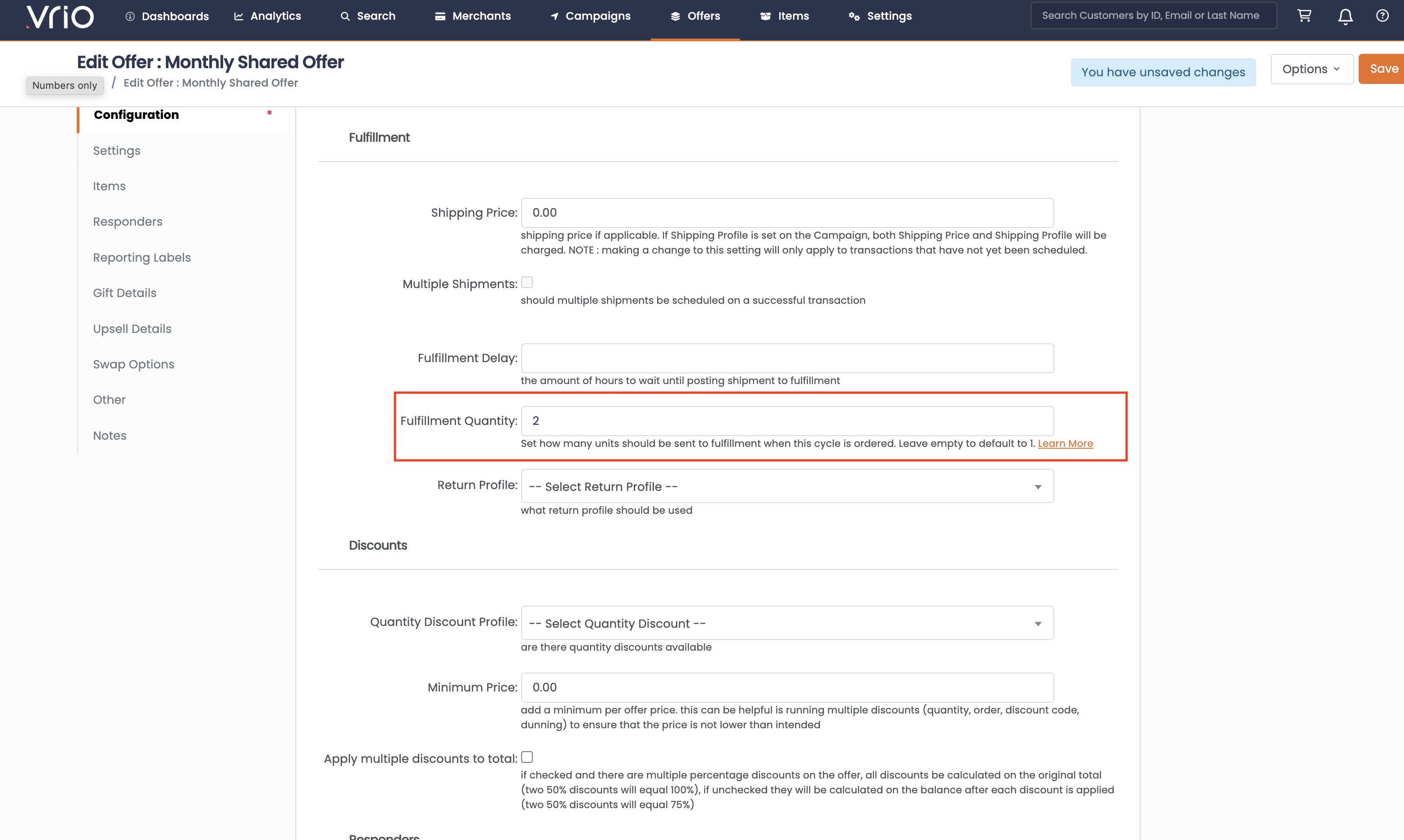
For Shared Offers, open the offer and click on the Configuration tab to edit cycle-level settings including fulfillment quantity.
Important Notes
- Defaults to 1: If left blank or set to 0, the system will send a quantity of 1
- Per-cycle configuration: Each cycle can have a different fulfillment quantity
- New transactions only: Changes to fulfillment quantity only affect newly created transactions, not existing ones
Apply to Initial Shipment Only (Prepaid Cycles)
When an offer cycle uses Multiple Shipments (prepaid sequences where one charge produces several shipments), you can choose whether the Fulfillment Quantity should apply to every shipment in the sequence or only the first one. The Fulfillment Quantity on Initial Shipment Only checkbox controls this.
How It Works
- Unchecked (default) — the Fulfillment Quantity is applied to every prepaid shipment in the cycle.
- Checked — the Fulfillment Quantity is applied only to the first prepaid shipment. Subsequent prepaid shipments use the item's natural quantity (typically 1).
Example
Charge once per quarter, ship monthly (3 prepaid shipments per charge cycle), Fulfillment Quantity = 3:
| Setting | Shipment 1 | Shipment 2 | Shipment 3 |
|---|---|---|---|
| Unchecked | 3 units | 3 units | 3 units |
| Checked | 3 units | 1 unit | 1 unit |
When to Use
Useful for "starter pack + refill" patterns where the first shipment in a prepaid cycle ships more product than the follow-ups — for example, an initial 3-month supply plus single-bottle top-ups in the same paid period.
Visibility
The checkbox is only visible on the offer cycle form when Multiple Shipments is checked. If Multiple Shipments isn't in use, the setting has no effect and stays hidden.
Shipping Price Configuration
How Shipping Pricing Works
Vrio calculates shipping costs using a two-layer system:
- Campaign Shipping Profiles - Base shipping rates configured at the campaign level. Learn more about shipping profiles.
- Offer Shipping Prices - Additional charges configured per offer cycle
The total shipping cost is: Base Campaign Shipping + Offer Cycle Shipping Price
Shipping Costs Per Cycle
Each offer cycle can have different shipping prices that are added on top of your campaign shipping profiles:
Example Configuration:
- Campaign shipping profile: $2.99 (base rate for all offers in this campaign)
- Offer Cycle 1 shipping price: $0.00 (free shipping for first order)
- Offer Cycle 2+ shipping price: $2.00 (additional charge for renewals)
Customer sees:
- First order: $2.99 total shipping (campaign base only)
- Renewal orders: $4.99 total shipping (campaign base + offer addition)
This layered approach allows you to:
- Set consistent base shipping rates across campaigns
- Add offer-specific shipping incentives or charges
- Test shipping price sensitivity per offer
- Cover varying shipping costs across different subscription cycles
Common use cases:
- Free shipping trials: Set offer cycle 1 to $0.00 to waive shipping on first orders
- Shipping cost increases: Add charges to later cycles to cover rising fulfillment costs
- Premium shipping: Add extra charges for expedited shipping on certain cycles
To update the shipping price on a Custom Offer, click on the cycle you want to edit and add the shipping price under fulfillment.
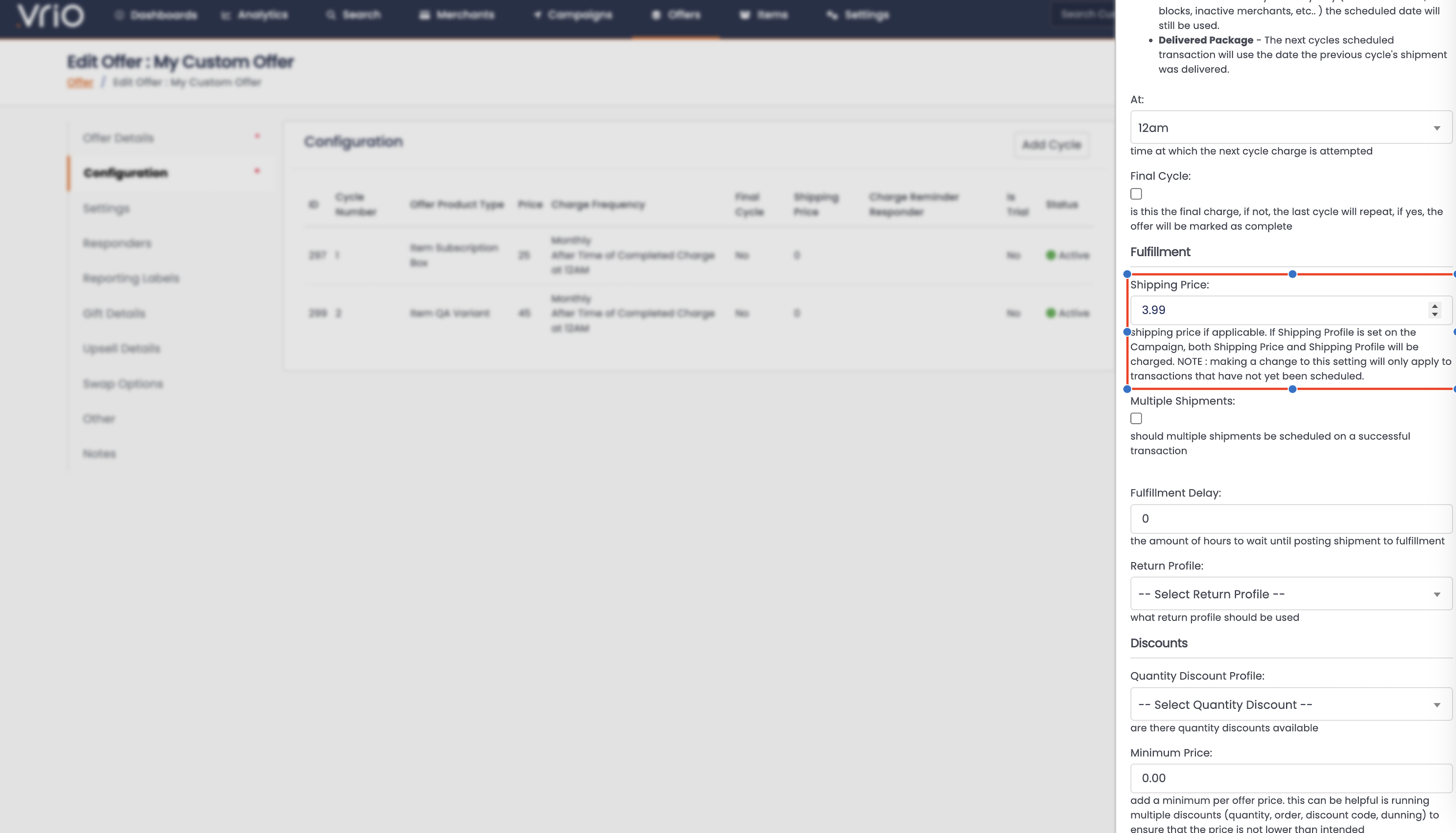
To update the shipping price on a Shared Offer, open the offer you want to edit and click on the Configuration tab to edit the offer cycle level shipping.
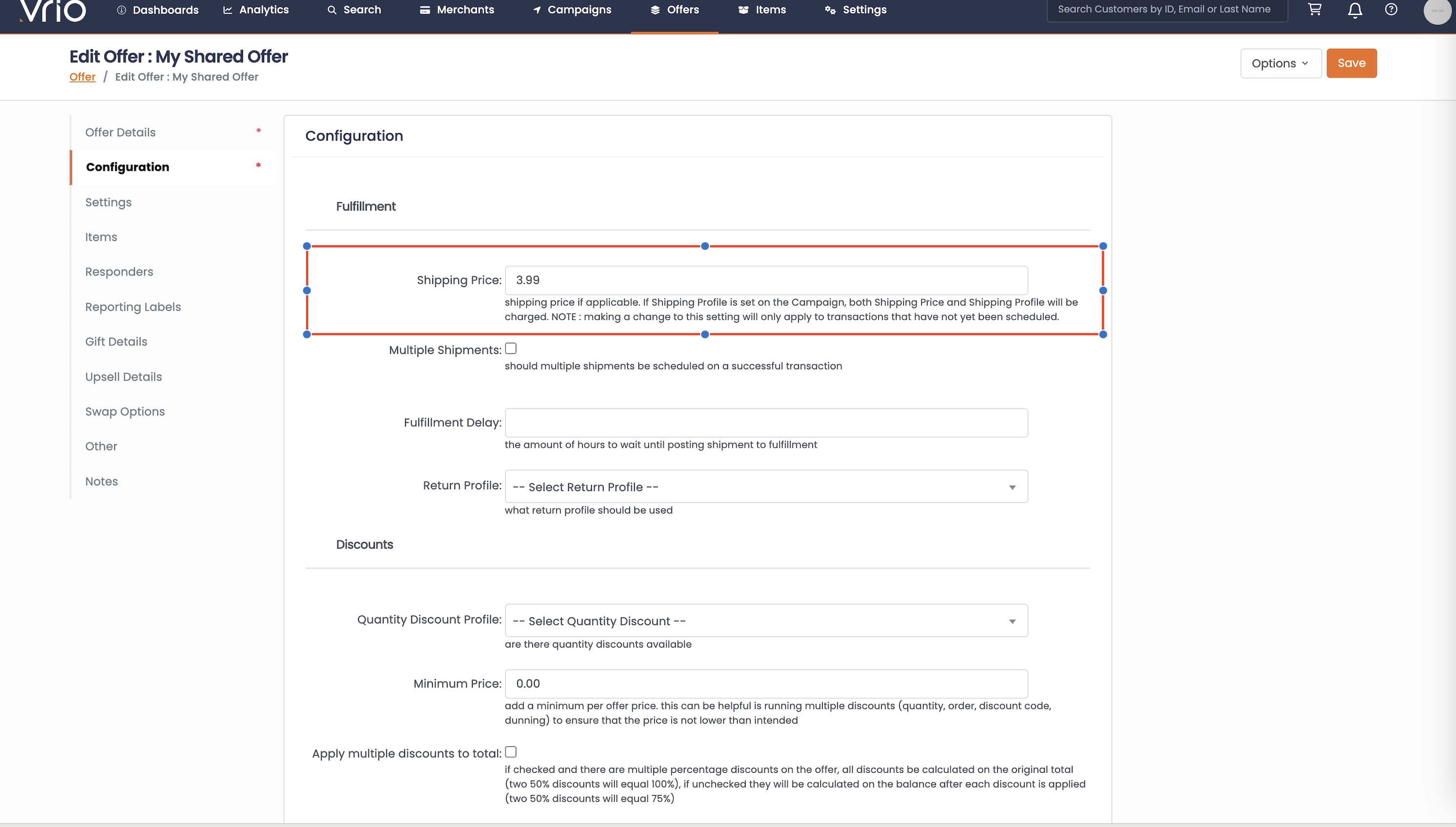
Keep in mind that this will only effect newly created transactions. Which is similar to the logic when updating the price on an offer cycle. For more information read here.
Remember: The flexibility of Vrio's shipping system means you can create almost any fulfillment model your business needs. Start with your ideal customer experience and work backwards to the configuration.
Add Free Shipment
The Add Free Shipment action lets you create a new shipment on an existing subscription without charging the customer. This action lives on the Order Offer (not the shipment directly) and is useful for sending replacement items, bonus products, or goodwill gestures without creating a new transaction.
Enabling Free Shipments
Free shipments must be enabled on the offer before the action appears:
-
Open the Offer you want to configure
-
Navigate to the Settings tab
-
Check Add Shipment to enable
-
Save the offer
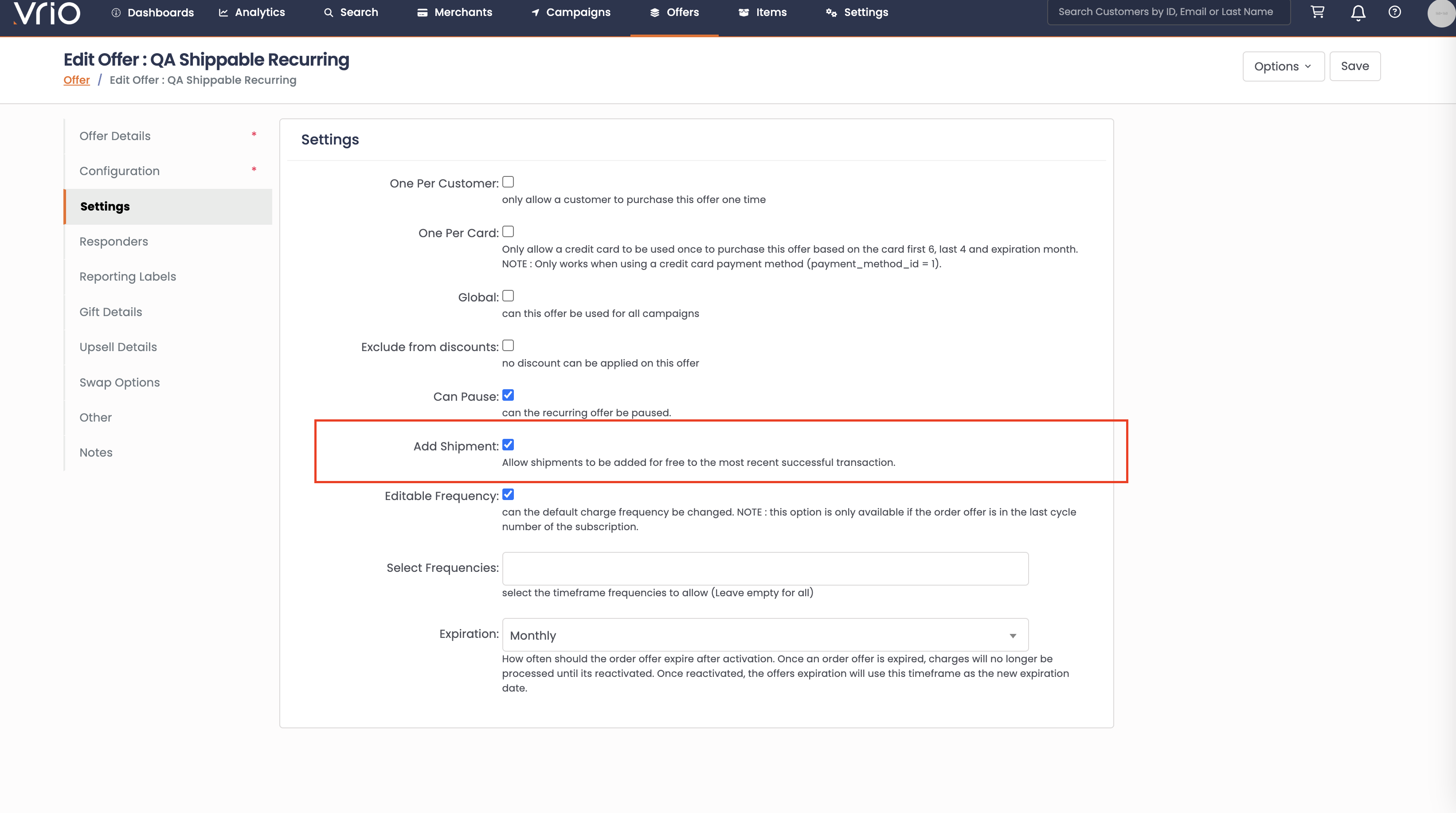
Once enabled, the Add Free Shipment option appears in the Order Offer actions dropdown on customer records.
How to Add a Free Shipment
-
Navigate to the customer record and find the Order Offer you want to add a shipment to
-
Click the Actions dropdown on the order offer
-
Select Add Free Shipment
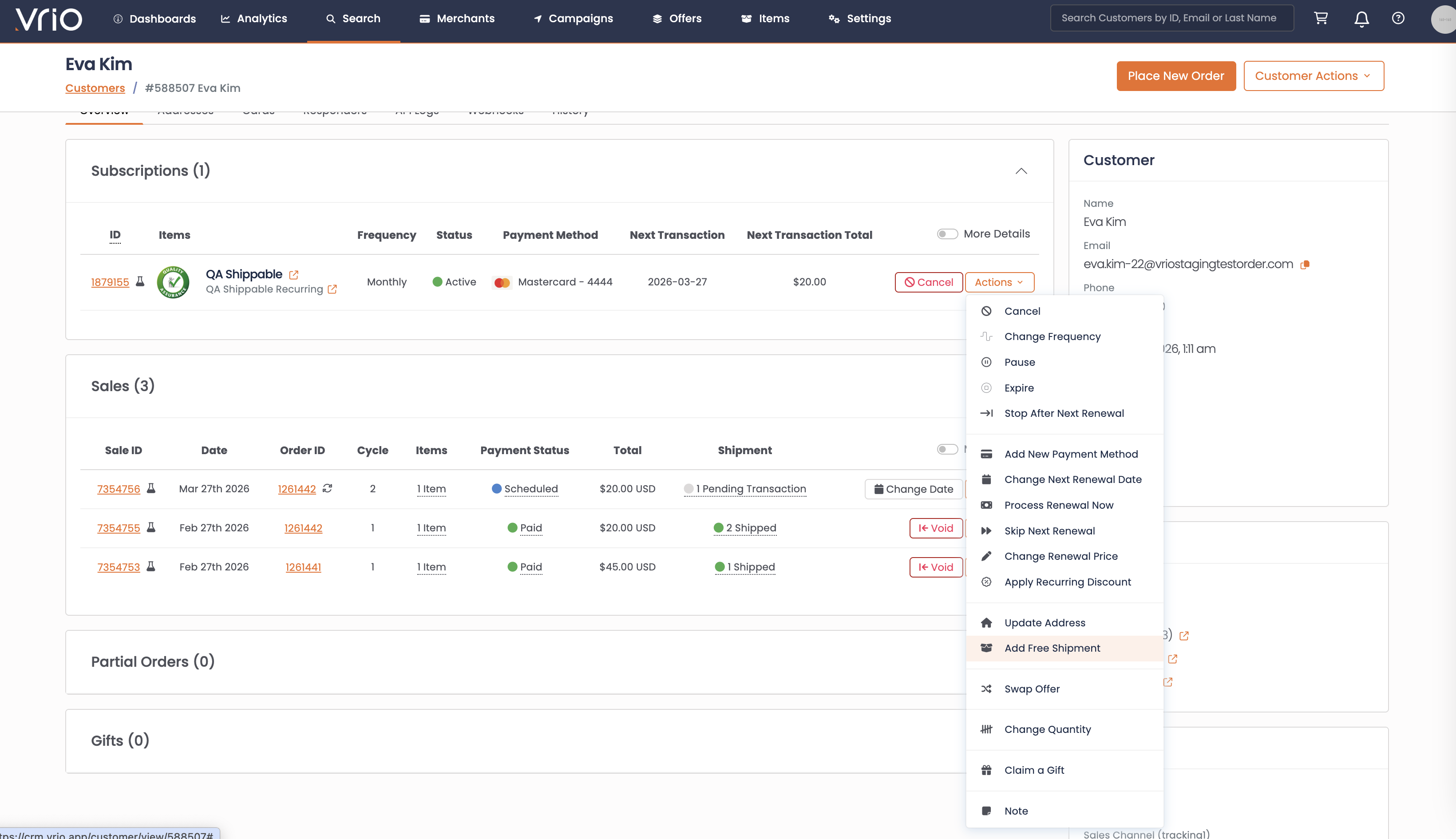
-
Add any optional Notes for the record
-
Click Submit
What Happens
The system finds the last completed shipment for the order offer (excluding skipped, cancelled, or declined shipments), loads that shipment's items and offer cycle, then creates a new child shipment:
- New shipment created — A child shipment is created with the same items from the last completed shipment
- Scheduled 15 minutes out — The new shipment is scheduled 15 minutes in the future, giving you time to make edits (e.g., change address or items) before it posts to fulfillment
- No charge — No transaction is created. The customer is not billed.
- Schedule unchanged — Existing pending shipments and future transaction dates are not affected
- Shipment posts normally — The new shipment follows the standard fulfillment flow (posted to the fulfillment connection, tracking received, etc.)
Prerequisites
| Condition | Details |
|---|---|
| Add Shipment enabled on offer | The Add Shipment setting must be checked on the offer's Settings tab |
| Order offer is completed | The order offer must have a completed order (the customer has been charged at least once) |
Updated 4 months ago