
Tax Profile
Configure manual tax calculation profiles by country and state with percentage-based rates for precise sales tax management across campaigns.
What is it
This is a manual way to configure sales tax based on Country and State. This will apply a single tax rate to any sale generated when using this Tax Profile.
How to add a new Tax Profile
- Navigate to Settings
- Scroll to Payment Workflows
- Select Tax Profiles
- Select Add New or click on the Tax Profile you would like to edit
- Enter the Country
- Enter State and
- Rate of your profile
- This is calculated as a percent of the subtotal
Where to apply
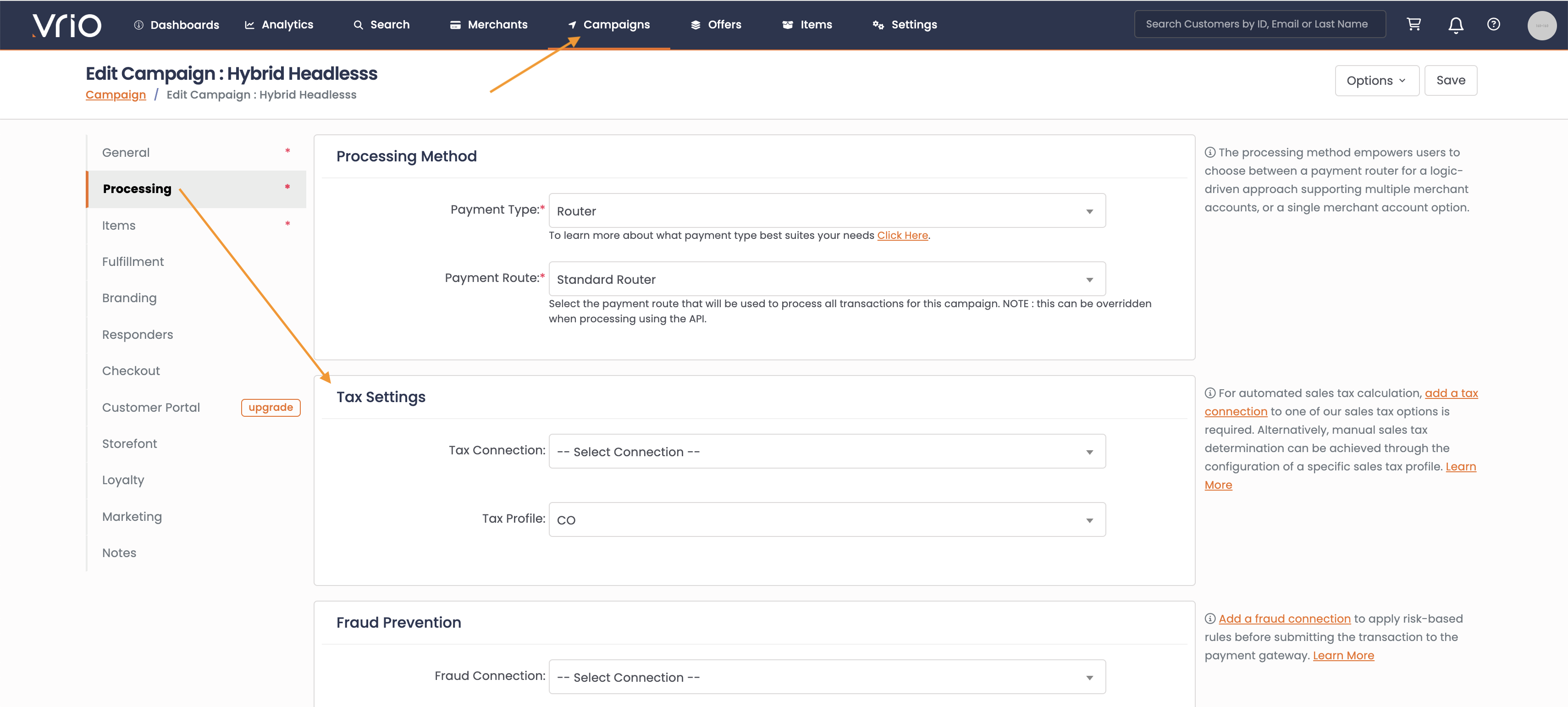
Add your Tax Profile to any Campaign that you wish.
-
Navigate to Campaigns
-
Select the Campaign
-
Navigate to the Processing Tab
-
Select the Tax Profile to apply
-
Hit Save
If your campaign has a Tax Connection and a Tax Profile. The Tax Connection will apply if available. If no tax information is passed back from the Tax Connection, Vrio will then default down to the Tax Profile.
Updated 12 months ago
Did this page help you?