
Reactivate a Subscription
A subscription reactivation is the process of renewing or restarting a previously canceled or expired subscription service, allowing access to its benefits or content once again.
Key Takeaways
- A subscription will reactive with all payment and order details as set at the time of cancellation.
- The charge will be scheduled for the next day from reactivation date.
Merchant Selection on ReactivationBy default, a reactivated subscription will use the most recent associated merchant. If that merchant is inactive, the system will switch to the fallback merchant configured on that merchant. The fallback merchant must be active and accept the same card type (e.g. Visa, Mastercard) as the transaction. If no fallback is set, the fallback merchant is also inactive, or the fallback merchant does not accept the card type, the merchant will not be switched and a note will be added to the transaction. See Adding a Merchant for details on configuring a fallback merchant.
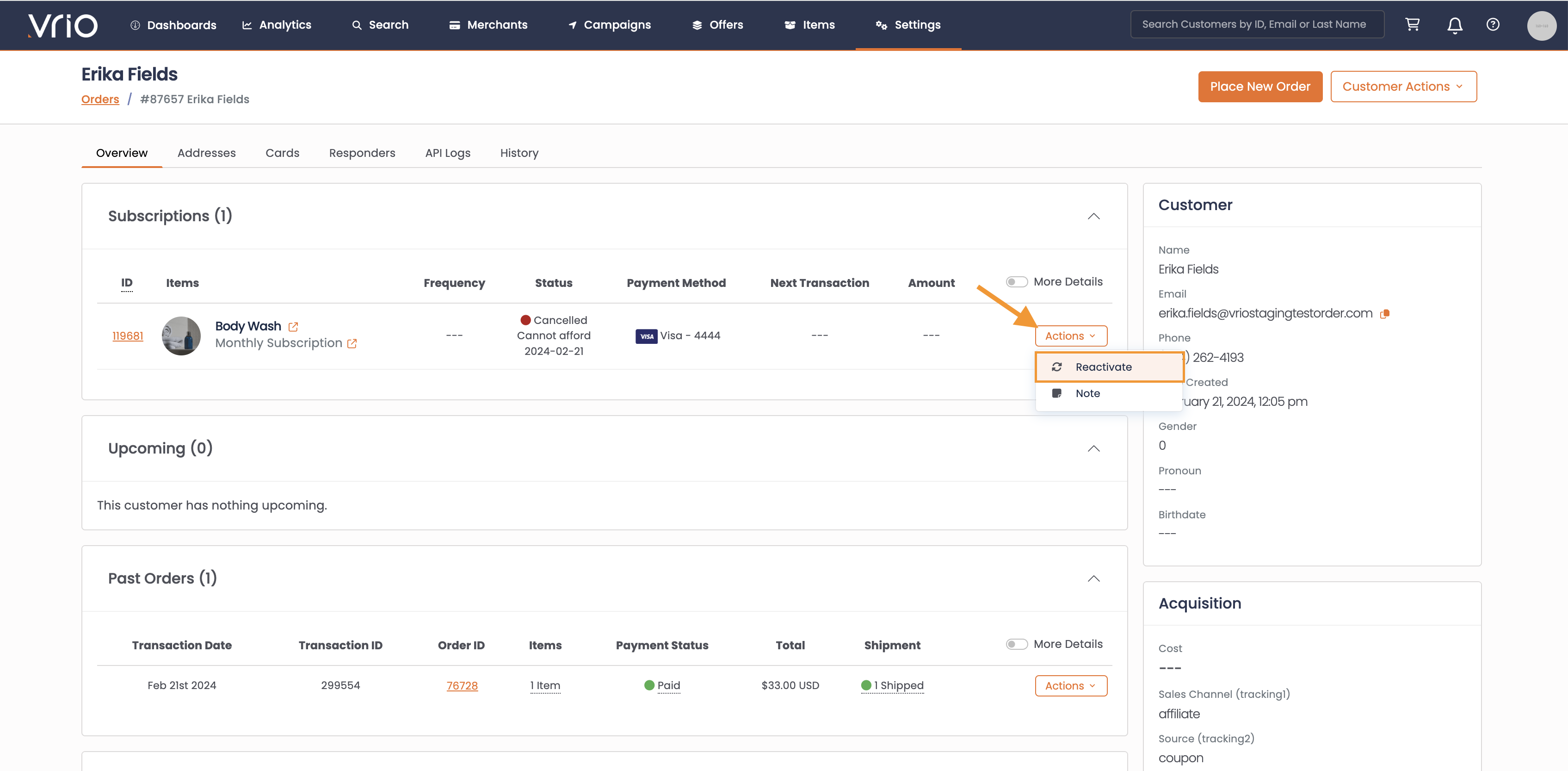
How to reactivate a subscription
-
Under the Subscription Section, select the subscription to reactivate
-
Click Actions
-
Select Reactivate
Bulk Reactivate Subscriptions
Need to reactivate multiple cancelled subscriptions at once? Use the bulk reactivate feature to reactivate up to 200 subscriptions in a single operation.
Updated 6 months ago