
Fulfillment Settings
Configure shipping profiles, costs, and restrictions for your campaign
Within the Campaign, under the Fulfillment tab, you may configure fulfillment routers, fulfillment connections, add Shipping Logic to determine Shipping Cost and Restrictions.
Fulfillment Priority Hierarchy
When determining which fulfillment connection to use for a shipment, Vrio follows this priority order:
- Fulfillment Router (Highest Priority) — If a fulfillment router is set on the campaign and has a matching configuration record for the customer's country and state, that connection is used.
- Campaign-Level Fulfillment Connection — If no router is set (or no matching record exists), the campaign-level fulfillment connection is used.
- Item-Level Fulfillment Connection — If neither a router nor a campaign-level connection is configured, the fulfillment connection set on the individual item is used.
Fulfillment Router
You can set a Fulfillment Router on the campaign to automatically route shipments to different fulfillment providers based on the customer's shipping address country and state. When a fulfillment router is set, it overrides both campaign-level and item-level fulfillment connections.
- Navigate to your Campaign and select the Fulfillment tab
- Select a Fulfillment Router from the dropdown
- Click Save
Learn more about setting up Fulfillment Routers.
Fulfillment Connection Override
You can set a fulfillment connection at the campaign level that will override any fulfillment connections configured on individual items. When a fulfillment connection is set on a campaign, all shippable items sold through that campaign will use the campaign-level connection instead of their item-level connection settings.
When to use campaign-level fulfillment connections:
- Multi-channel selling - Use the same items across multiple campaigns but route fulfillment to different 3PL providers based on the sales channel
- Regional fulfillment - Route orders from different campaigns to geographically appropriate warehouses
- Testing new providers - Test a new fulfillment provider on a specific campaign without changing item configurations
- Brand-specific fulfillment - Different brands (campaigns) may have different fulfillment arrangements even when selling identical products
How it works:
- Navigate to your Campaign and select the Fulfillment tab
- Select a Fulfillment Connection from the dropdown
- Once set, all shippable items in this campaign will send their shipments to this connection
- The fulfillment connection set on individual items will be ignored for orders placed through this campaign
- Reships will use the campaign connection if one is configured at the time the reship is created
Connection Priority
Fulfillment Routers take the highest priority, followed by campaign-level connections, then item-level connections. If you need location-based routing, use a Fulfillment Router. If you need all items in a campaign to use the same connection regardless of location, use a campaign-level connection. If you need specific items to use different connections within the same campaign, leave the campaign-level connection blank and set connections on individual items instead.
Shipping Configuration
- Shipping Profiles - These allow you to set up customized guidelines for determining shipping methods, costs, and other related parameters based on specific criteria.
- A Shipping Profile may calculate the Shipping Cost based on the Cart Total and/or the Weight of the Items within the cart.
- Shipping Profiles also may be specific to Shipping Carriers and/or shipping classes.
- Subscription Shipping - Do these shipping fees continue on every subsequent renewal of a subscription or just on the Initial purchase?
- Discounted or Free Shipping - Within Shipping Profiles you can setup rules for Free Shipping by Spending $X.
- Shipping Profiles also allow you to set the Countries allowed to utilize that specific profile.
- Shipping Restrictions - Within the campaign, you may also restrict what Countries and/or States your Items may be sold in.
Country Restrictions
Within the Campaign, if there are Countries to Allow present, only orders with shipping addresses associated to those Countries will be accepted.
If a Shipping Profile has certain countries restricted to, and that profile is set on a campaign where those countries are not allowed, that profile will never be available.
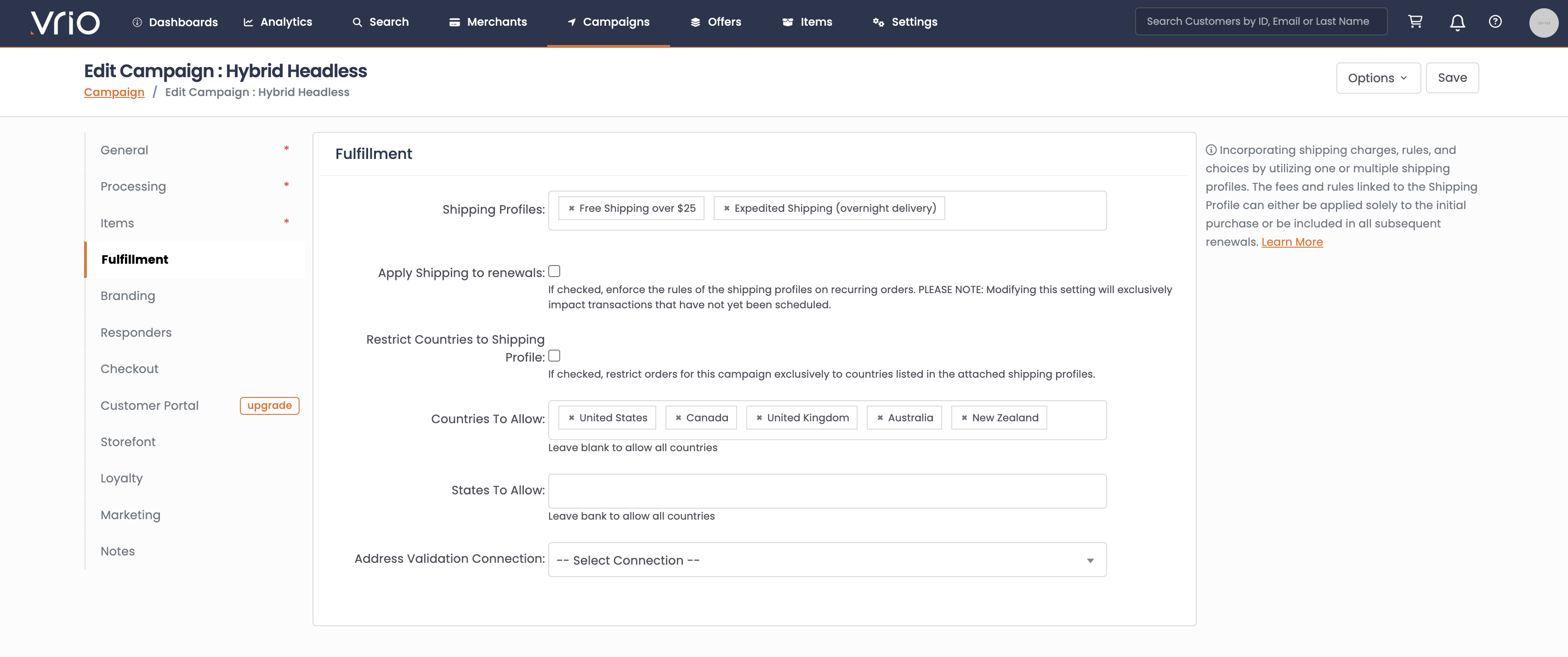
Fulfillment Fields Defined
| Field | Defined |
|---|---|
| Fulfillment Router | Select a Fulfillment Router to automatically route shipments to different fulfillment connections based on the customer's shipping address country and state. When set, this overrides campaign and item-level fulfillment connections. Learn More |
| Fulfillment Connection | Select a fulfillment connection to route all campaign shipments to a specific fulfillment provider. When set, this overrides item-level fulfillment connections. Learn More |
| Shipping Profiles | Add all applicable Shipping Profile options available for this campaign. |
| Apply Shipping to renewals | If Checked, the shipping calculated at checkout will remain the shipping fee for all subsequent renewals of a subscription. |
| Restrict Countries to Shipping Profile | If checked, only the available countries within the applicable Shipping Profiles associated will be accepted. |
| Countries to allow | If additional countries should be allowed, outside of the Shipping Profiles, add all countries accepted for this campaign. |
| States to Allow | If there are any state restrictions, add only States that are allowed to purchase from this Campaign. |
Updated 7 months ago