
Troubleshooting
Troubleshooting payment router issues including route_merchant_invalid errors, missing route logs, merchant selection issues, and routing logic analysis.
This guide covers common payment router issues and how to resolve them. For each issue, check the Route Log on the order to see detailed routing decisions.
Common Issues
Error: route_merchant_invalid / customer_merchant_group_invalid
What it means: After all routing rules were applied, no merchants are available to accept the order.
Error codes:
route_merchant_invalid- No merchants available (general)customer_merchant_group_invalid- Customer is in a merchant group, no merchants available after all rules applied, and merchant group fallback is set to "Decline"
How to troubleshoot:
- Navigate to the order and click the Route Log tab
- Review which rules excluded merchants:
- Merchant Groups (customer already ordered from all merchants in group)
- Reattempt Restrictions (similar merchants excluded after decline)
- BIN Blocks (card BIN is blocked on merchants)
- Item Routing (no merchant supports all cart items)
- Order Caps (merchants hit their transaction limits)
- Check merchant availability for this payment method and card type
- Adjust your routing configuration based on what you find
Common causes:
- All merchants in a merchant group have been used by this customer (and fallback is set to "Decline")
- All available merchants hit their order caps
- Force Item Routing is enabled but no merchant supports all cart items
- BIN blocks preventing card from being processed
- Reattempt restrictions excluding too many merchants
Why do I not see any Route Logs?
Possible reasons:
1. Transaction didn't go through a payment router
- Campaign is configured to use a single merchant instead of a router
- Check: Campaign > Processing > Payment Type should be "Router"
2. API override bypassed the router
- If
merchant_idwas passed in the API call, the router is completely bypassed - Check: Review your API request for
merchant_idparameter
3. Order hasn't been processed yet
- Route logs only appear after a payment attempt is made
- Check: Order status and transaction history
4. Viewing a rebill/renewal transaction (Cycle 2+)
- Route logs only apply to initial transactions (Cycle 1)
- Renewals continue on the same merchant as the initial transaction
- Check: Transaction cycle number
Merchant not receiving transactions
How to troubleshoot:
- Check the Route Log on recent orders to see if merchant appears in available merchants list
- Review exclusion reasons in the Route Log
Common causes:
- Merchant inactive on router: Settings > Payment Routers > [Your Router] > Check merchant is Active = Yes
- Exceeded monthly processing limit: Merchant hit their configured monthly volume cap
- Order cap reached: Merchant hit their daily/weekly/monthly order cap for initial transactions
- BIN blocks excluding cards: Merchant has BIN blocks that exclude customer cards
- Item routing excluding merchant: Merchant doesn't support items in cart (when Force Item Routing enabled)
- Merchant group excluding merchant: Customer already ordered from this merchant within their merchant group
- Another merchant has active priority: Different merchant's priority is consuming all transactions
- Currency mismatch: Merchant doesn't support the router's currency
Solution: Check merchant configuration and adjust caps, BIN blocks, item support, or priority settings.
Unbalanced Round Robin distribution
What it means: Round Robin isn't rotating evenly through merchants as expected.
Common causes:
1. Reattempts affecting rotation
- Reattempt restrictions cause attempts to bounce between merchants
- Solution: Enable "Exclude Reattempts" on Round Robin setting
2. Include Declines setting
- When unchecked, declined transactions don't trigger rotation to next merchant
- Solution: Check "Include Declines" if you want declines to rotate
3. Merchant caps or priorities
- Order caps or priority settings override Round Robin distribution
- Solution: Review cap and priority settings on each merchant
4. Exclusion rules removing merchants
- BIN blocks, item routing, or merchant groups excluding merchants from rotation
- Solution: Review Route Logs to see which merchants are available for each transaction
Error: no_merchant_available_items
What it means: Force Item Routing is enabled, but no merchant supports all items in the cart.
How to troubleshoot:
- Navigate to Settings > Payment Routers > [Your Router]
- Check which items are configured on each merchant
- Review the cart items on the failing order
Solutions:
- Add item support to one or more merchants in the router
- Uncheck "Force Item Routing" to allow merchants without item restrictions
- Remove items from cart that aren't supported
Merchant appears in router but isn't being selected
How to troubleshoot:
- Check the Route Log to see if merchant appears in the available merchants list
- Review which rules excluded the merchant
Common causes:
- BIN Priority active: Another merchant has BIN priority for this card BIN, overriding all other merchants
- Priority Settings active: Another merchant has priority enabled and hasn't hit their limit yet
- Reattempt restrictions: Merchant excluded due to similar characteristics (same gateway/processor/category)
- BIN blocks: Merchant has a BIN block matching this card
- Item routing: Merchant doesn't support items in cart
- Order cap reached: Merchant already hit their order cap for the timeframe
- Merchant group: Customer already ordered from this merchant within their group
Solution: Review the specific exclusion reason in Route Log and adjust configuration accordingly.
Currency declined or wrong merchant selected
What it means: Transaction declined due to currency mismatch or wrong currency charged.
Common causes:
- Merchant doesn't support the router's configured currency
- Router currency doesn't match campaign or item pricing expectations
How to troubleshoot:
- Check: Settings > Payment Routers > [Your Router] > Route Currency
- Check: Settings > Merchants > [Merchant] > Currencies tab
- Verify merchant has the router's currency enabled
Important: Each router supports only one currency, and the router's configured currency governs every transaction routed through it. A currency_id passed via API does not override a router's currency and is ignored on router campaigns — it applies only to single-merchant campaigns and merchant_id overrides. To process a router campaign in a different currency, use a router configured for that currency (via route_id), or pass merchant_id to bypass routing.
Learn more: API Payment Overrides
How to Read the Route Log
The Route Log shows the complete routing decision process for each payment attempt.
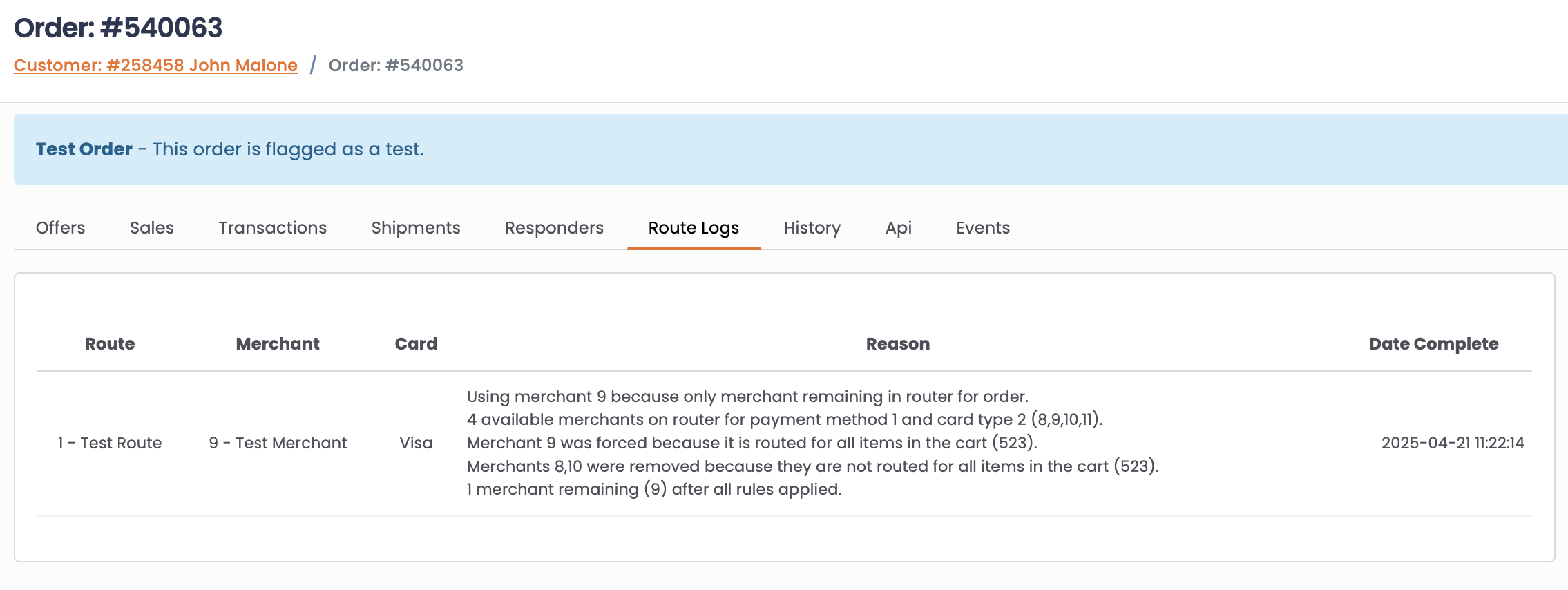
What you'll see in the Route Log:
- Available merchants count - How many merchants matched the payment method, card type, and basic criteria
- Merchant Groups applied - Which merchants were included or excluded based on customer's merchant group
- BIN Rules applied - Which merchants were excluded due to BIN blocks or included due to BIN priority
- Caps applied - Which merchants were excluded because they hit their order caps
- Priorities applied - Which merchants were prioritized over others
- Reattempt Logic applied - Which merchants were excluded due to reattempt restrictions
- Item Routing applied - Which merchants were excluded because they don't support cart items
- Final merchant selected - Which merchant was chosen and why (routing method, only remaining, priority, etc.)
How to use the Route Log:
- Navigate to any order
- Click the Route Log tab
- Review the log from top to bottom to see the decision flow
- Identify which rule caused unexpected behavior
- Adjust your router configuration based on findings
Learn more about the complete routing decision flow
Testing Your Router
Before going live, always test your payment router to prevent issues. Learn more: Testing a Router
Related Documentation
- Payment Router Logic - Complete routing decision flow
- Router Setup - Creating and configuring routers
- Initial Decline Reattempts - IDR configuration
- Priorities and Caps - Priority and capacity settings
- Item-Based Routing - Item restrictions
- BIN Routing - BIN blocks and priorities
Updated 3 months ago