
Shipstation
Key Takeaways
- API Keys are generated from Shipstation
- Shipstation does allow for Split Shipments
Connecting your Shipstation
- First you will need to get API Credentials from Shipstation
- Then you will input those credentials in the the Vrio Shipstation Connection
To generate your API Keys within Shipstation:
- Go to Account
- Select API Settings
- Choose Generate API Keys
These are they Keys that will be input into the Vrio Connection: ShipStation
See additional information for Shipstation here.
Store IDIf you have multiple stores connected into a single ShipStation Account. You will need to add the Store ID at the time of connecting the ShipStation Connection within Vrio
To add the Shipstation Connection within Vrio:
- Navigate to Settings
- Scroll down to the Connections Section
- Select Add New Connection
- Under the Fulfillment Tab, find Shipstation and select Connect Now
Here you will enter your API Keys that you generated from within Shipstation
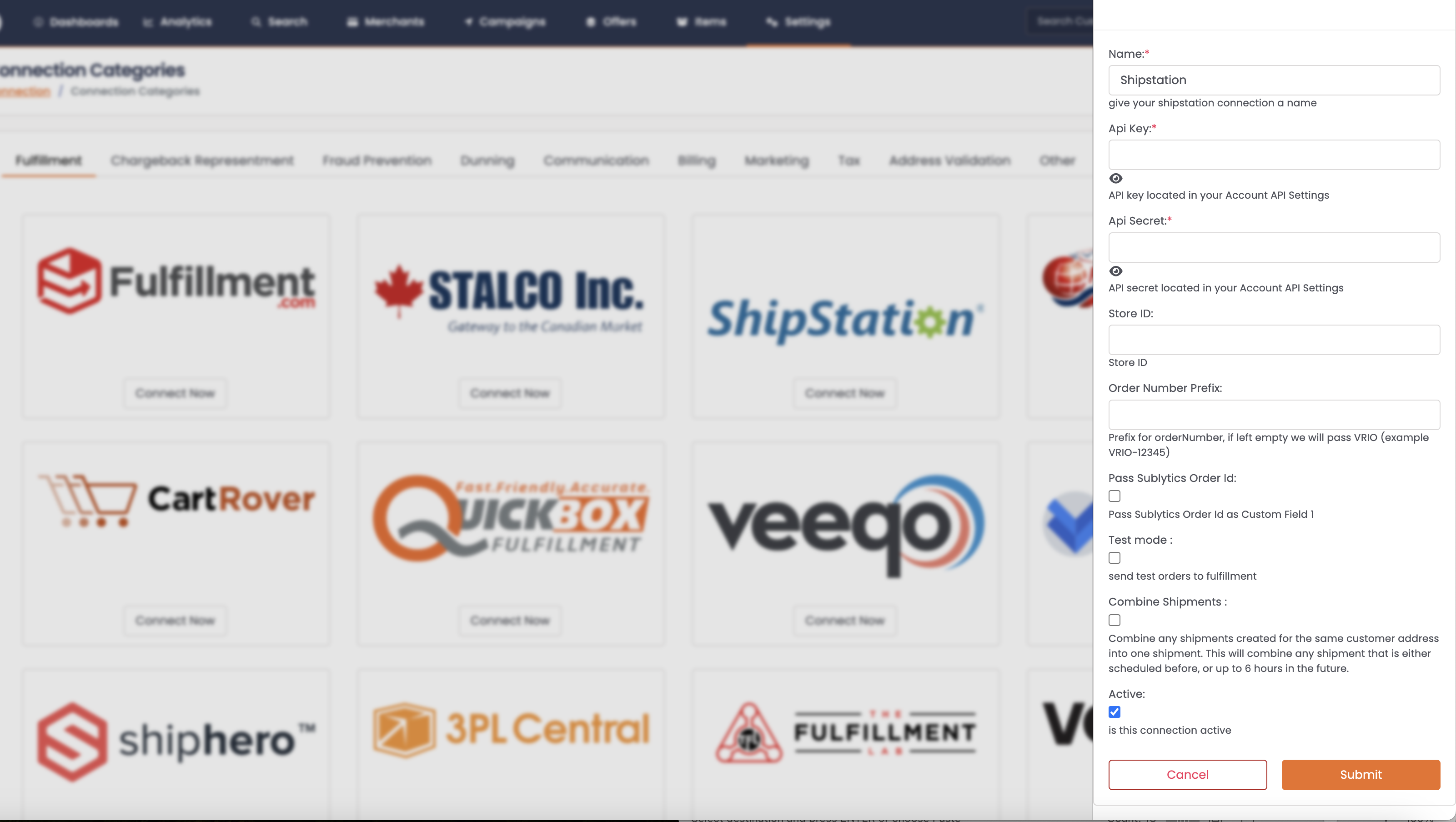
Shipstation Settings
Within the Shipstation Connection there are additional settings that you can configure for this connection
| Connection Value | Description | Uses |
|---|---|---|
| API Key | Generated in Shipstation | |
| API Secret | Generated in Shipstation | |
| Partner Key | Generated in Shipstation | This is an optional field that is used when you have purchased the ability to increase the amount of API calls allowed to Shipstation. |
| Store ID | Generated in Shipstation | This is used if there are multiple Stores setup in a single Shipstation account. |
| Order Number Prefix | Add a prefix to be passed to Shipstation to be used in front of the Shipment ID from Vrio | |
| Pass Vrio Order ID | This will pass the Vrio Order ID to Shipstation's Custom Field 1 in advancedOptions | This is used commonly for shipping labels |
| Custom Field 2 Value | This will pass the input details to the Shipstation Custom Field 2 | |
| Test Mode | When checked, all test orders will be submitted to Shipstation When unchecked, no test orders will be submitted to Shipstation | This is recommended to be used at initial launch. Ensure to disable prior to going live. |
| Combine Shipments | Combine any shipments created for the same customer address into one shipment. This will combine any shipment that is either scheduled before, or up to 6 hours in the future. |
ID Mapping
| Vrio | Shipstation |
|---|---|
| Shipment ID | Order ID |
| requestedShippingService | Code field within the Shipping Profile |
Here is an example request from Vrio to Shipstation:
Request:
{
    "orderNumber": "{connection prefix + shipment_id}",
    "orderDate": "",
    "customerEmail": "",
    "items": [
        {
            "lineItemKey": "",
            "quantity": "",
            "name": "",
            "sku": "",
            "unitPrice": "",
            "options": []
        }
    ],
    "orderStatus": "",
    "shipTo": {
        "name": "",
        "phone": "",
        "street1": "",
        "street2": "",
        "city": "",
        "state": "",
        "postalCode": "",
        "country": "",
        "company": ""
    },
    "amountPaid": "",
    "taxAmount": "",
    "shippingAmount": "",
    "requestedShippingService": "{Vrio Shipping Profile Code}",
    "advancedOptions": {
        "customField1": "{Vrio Order ID if Pass Vrio Order ID is enabled}",
        "customField2": "{Value from Custom Field 2 Value setting if configured}",
        "storeId": "{Automatically added from Store ID setting if configured}"
    },
    "billTo": {
        "name": "",
        "phone": "",
        "street1": "",
        "street2": "",
        "city": "",
        "state": "",
        "postalCode": "",
        "country": "",
        "company": ""
    }
}
Merged Shipments
Vrio supports merging shipments in two ways:
Merging Shipments in Vrio
When the Combine Shipments setting is enabled in your Vrio Shipstation Connection, Vrio will automatically combine shipments going to the same customer address. This will combine any shipment that is either scheduled before, or up to 6 hours in the future, into a single shipment sent to Shipstation.
Merging Shipments in Shipstation
If you merge shipments directly within Shipstation (after they've been sent from Vrio), Vrio will detect this when collecting tracking information. When Vrio finds shipments that were merged in Shipstation, it uses the mergedIds from Shipstation's response to track all the associated Vrio shipments and apply the tracking information to each one.
Split Shipments Not SupportedIf shipments are split within Shipstation, Vrio does not currently support this when collecting tracking information. Avoid splitting shipments in Shipstation to ensure tracking information is properly collected in Vrio.
Updated 12 months ago