
Auth & Capture
Understand authorization and capture transaction flows in Vrio, including why you'd authorize, how to process auths via API, and the different ways to capture an authorization.
When a transaction is processed in Vrio, it's typically a sale — the customer is charged immediately and the order moves into fulfillment. Sales and captures are the transaction types that drive fulfillment: they create shipments, trigger post-shipment connections, and move the order forward.
An authorization works differently. It verifies the customer's payment method and places a hold on funds, but it does not collect payment. The order sits in an authorized state until a capture is processed to collect the funds.
Why Authorize Instead of Sell?
The two-step approach — authorize first, capture later — is useful when you need to:
- Verify a payment method before committing to fulfillment
- Hold funds while waiting on an external approval — for example, verifying a prescription with a doctor before shipping a pharmacy order
- Support upsell flows where the final order amount may change before capture
- Control when payment is collected by deciding exactly when to trigger the capture
Authorizations don't create shipments by default
An authorization on its own does not create shipments — the order waits for a capture before fulfillment begins. The one exception is when the order uses the On Shipment Shipped Auto Capture Trigger (set on the campaign or passed per-order via the API), which intentionally creates shipments on the auth so that fulfillment can begin while the payment is still just a hold.
The Auth & Capture Lifecycle
Step 1: Authorization
When an authorization is processed, Vrio sends the request to the payment gateway, which verifies the customer's payment method and places the hold on the transaction amount. On a successful response, Vrio creates a transaction record (transaction_type_id: 6) on the order, marks the order as authorized, and sets date_authorized.
At this point, the customer has not been charged. The funds are reserved on their card by the gateway, but no money has been collected.
Auth Expiration
Authorizations are temporary holds managed by the payment gateway — not by Vrio. Most processors hold funds for 5-7 days, though this varies by gateway and card issuer. Vrio will allow you to attempt a capture at any time, but whether the capture succeeds depends on the gateway. If the hold has expired on the gateway side, the capture will be declined and a new authorization would need to be created.
Step 2: Capture
When a capture is processed, Vrio sends the capture request to the gateway referencing the most recent successful authorization on the order. On success, the gateway collects the funds and Vrio creates a child transaction record (transaction_type_id: 7) on the order — its parent is that authorization's transaction ID. When the capture lands successfully:
date_orderedanddate_captureare set on the order, marking it as complete- The order offer is marked as Active (for subscriptions) or Complete (for one-time sales)
- The subscription begins — the first recurring transaction is created and scheduled
- Shipments are created and sent to fulfillment (unless they were already created on the auth by the On Shipment Shipped trigger)
The capture is what activates the subscription. Until capture succeeds, the order is authorized but not active — the customer can re-authorize, accept upsells, or make changes without affecting a running subscription.
Processing an Authorization
To process an authorization at order creation, pass action as authorize to the POST /orders endpoint:
curl -X POST "https://api.vrio.app/orders" \
  -H "X-Api-Key: YOUR_VRIO_API_KEY" \
  -H "Content-Type: application/json" \
  -d '{
    "connection_id": 1,
    "campaign_id": 18,
    "offers": "[{\"offer_id\": 89, \"order_offer_quantity\": 1, \"order_offer_price\": 25.00}]",
    "action": "authorize",
    "email": "[email protected]",
    "bill_fname": "John",
    "bill_lname": "Doe",
    "bill_address1": "123 Main St",
    "bill_city": "Anytown",
    "bill_state": "NY",
    "bill_zipcode": "12345",
    "bill_country": "US",
    "ship_fname": "John",
    "ship_lname": "Doe",
    "ship_address1": "123 Main St",
    "ship_city": "Anytown",
    "ship_state": "NY",
    "ship_zipcode": "12345",
    "ship_country": "US",
    "card_number": "4111111111111111",
    "card_exp_month": "12",
    "card_exp_year": "2025",
    "card_cvv": "123"
  }'
Successful Authorization
A successful authorization returns response_code: 100. The transaction object will have transaction_type_id: 6, confirming it was processed as an auth:
{
  "success": true,
  "response_code": 100,
  "transaction_id": 6501056,
  "customer_id": 470177,
  "order_id": 1114897,
  "merchant_id": 6,
  "order": {
    "order_id": 1114897,
    "customer_card_id": 980231,
    "customer_id": 470177
  }
}
Declined Authorization
If the authorization is declined, no hold is placed on the customer's card. You can retry with the same or a different payment method:
{
  "success": false,
  "response_code": 200,
  "error_message": "Payment authorization declined",
  "order_id": 1114897
}
101 Response Codes
Some gateways and payment methods (3DS, PayPal, Stripe with requires_action) return response_code: 101 on authorization, indicating additional verification is needed before the auth is finalized. You'll need to complete the authorization using POST /orders/{order_id}/complete before capturing.
Learn more: Handling 101 Response Codes →
Authorizing an Existing Order
You can also authorize an order that was created earlier — for example, an order created as a lead or a partial that you're now ready to authorize. Use POST /orders/{order_id}/authorize:
curl -X POST "https://api.vrio.app/orders/1114897/authorize" \
  -H "X-Api-Key: YOUR_VRIO_API_KEY" \
  -H "Content-Type: application/json" \
  -d '{
    "customer_card_id": 980231,
    "merchant_id": 6,
    "payment_method_id": 1
  }'
Multiple Authorizations on a Single Order
Multiple authorizations on a single order are supported — you can call the authorize endpoint again on an already-authorized order to place a new authorization. This is common in upsell flows where the order total changes after the customer accepts additional offers.
When the capture is later processed, Vrio captures the most recent successful authorization on the order. Any remaining uncaptured authorizations are automatically voided, releasing those holds on the customer's card.
Learn more: Single Order Upsell Processing →
Ways to Capture an Authorization
Once an authorization exists, you have three ways to capture it:
Capture Manually
Capture immediately from the customer view UI or via the API. This is the most direct path — you decide when, you make the call.
-
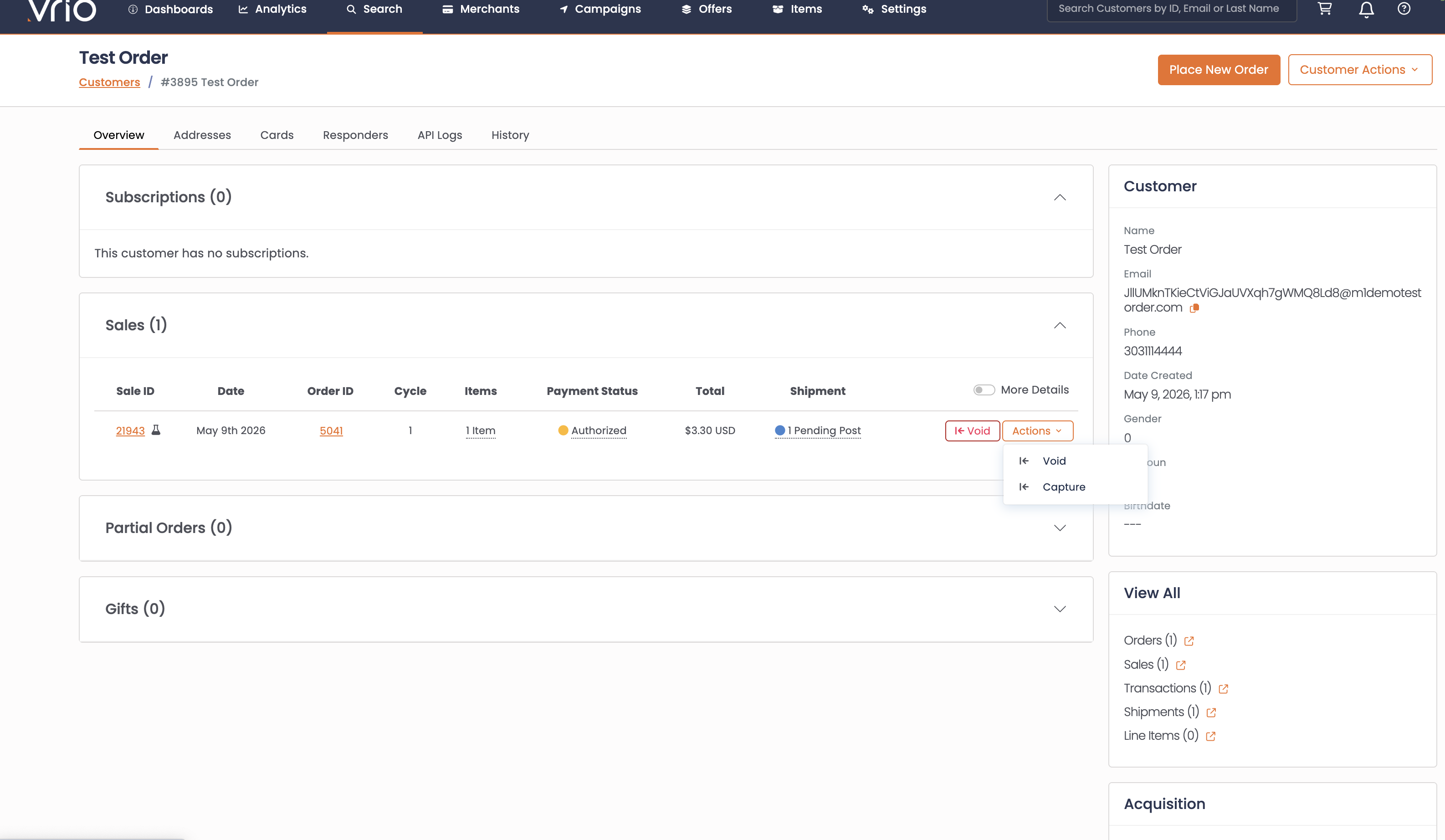
From the customer view UI — Use the Capture action on the authorization
-
Via API — Call POST /orders/
{order_id}/capture
curl -X POST "https://api.vrio.app/orders/1114897/capture" \
  -H "X-Api-Key: YOUR_VRIO_API_KEY" \
  -H "Content-Type: application/json" \
  -d '{}'
This captures the most recent successful authorization on the order. Any remaining uncaptured authorizations (from re-auths or upsells) are automatically voided.
Schedule a Capture via the API
If you know up-front when the capture should run, pass date_auto_capture on the auth. Vrio's capture batch picks up the order at that time and runs the capture automatically.
curl -X POST "https://api.vrio.app/orders" \
  -H "X-Api-Key: YOUR_VRIO_API_KEY" \
  -H "Content-Type: application/json" \
  -d '{
    "connection_id": 1,
    "campaign_id": 18,
    "offers": "[{\"offer_id\": 89, \"order_offer_quantity\": 1, \"order_offer_price\": 25.00}]",
    "action": "authorize",
    "date_auto_capture": "2026-05-12 14:00:00",
    "email": "[email protected]",
    "card_number": "4111111111111111",
    "card_exp_month": "12",
    "card_exp_year": "2025",
    "card_cvv": "123"
  }'
The capture batch runs on a schedule and looks for orders where date_auto_capture has passed and the order has not yet been captured. When it finds one, it processes the capture automatically.
This is useful when you need to delay capture for a specific amount of time — for example, waiting for a prescription verification, a fraud review, or an approval window — and you know upfront how long that delay should be.
If the scheduled capture fails, the batch clears date_auto_capture so it does not keep retrying on subsequent runs. The capture can then be reattempted manually from the customer view or by calling POST /orders/{order_id}/capture directly.
Use an Auto Capture Trigger
If you want authorizations to capture automatically based on an event — like a shipment shipping — use an Auto Capture Trigger. Triggers handle the capture without you needing to know the timing upfront.
Triggers can be applied two ways: configured on the campaign (so every order on that campaign uses the trigger) or set per-order via the API by passing auto_capture_trigger_id when the order is authorized.
Learn more: Auto Capture Triggers →
Testing Auth & Capture
When using the Test gateway, you can simulate declined authorizations and captures using specific billing zipcodes:
| Zipcode | Behavior |
|---|---|
decline_auth | Declines all authorization attempts |
decline_auth_50 | Declines authorizations when the transaction total is over $50 |
decline_capture | Declines all capture attempts |
decline_capture_attempt_1 | Declines the first capture attempt only — succeeds on reattempt |
These zipcodes work alongside the standard test cards. Pass them as bill_zipcode in your API request to trigger the specific scenario.
Recurring Transactions
By default, once the initial auth-capture cycle completes, subsequent recurring transactions are processed as sales — not authorizations. The auth-capture flow applies to the initial order only.
If you want recurring cycles to also use the auth-capture flow, enable Auto Capture on Recurring on the campaign. When enabled, each successful recurring authorization creates the next cycle's auth — the auth becomes the event that renews the subscription.
You can further control the billing cadence with Schedule on Capture. When enabled, the next recurring auth is created in a pending state and doesn't receive a scheduled date until the current cycle's capture is attempted. This ties the billing cadence to when payment is collected rather than when the authorization succeeded.
See the Auto Capture Triggers guide for the full subscription lifecycle explanation.
Related Documentation
- Auto Capture Triggers — Automate captures based on a campaign-level trigger event
- Single Order Upsell Processing — Auth-then-capture pattern for upsell flows
- Handling 101 Response Codes — Complete authorizations that require additional verification
- Dunning Profiles — Set up retry logic for declined transactions
- Payment APIs Overview — Overview of all payment processing options
Updated 4 months ago