
Update Merchants
Bulk update merchant settings and configurations using CSV file import.
Update multiple merchant records at once by uploading a CSV file. This is useful for bulk updating merchant settings, descriptors, processing limits, or gateway configurations.
Key Takeaways
- Updates existing merchant records only
- The
Merchant IDfield is required to identify records- Only include columns for fields you want to update
- Download the template to ensure correct column headers
Template
Required Fields
| Field | Description |
|---|---|
Merchant ID | The ID of the merchant to update |
Include additional columns only for the fields you want to change.
Editable Fields
| CSV Header | Description |
|---|---|
| Merchant ID | Required - ID of the merchant to update |
| Name of Merchant | Display name of the merchant account |
| Merchant Card Types | Accepted card types |
| Merchant Default Currency | Default currency for transactions (use currency ID) |
| Merchant Currencies | Supported currencies (comma-separated IDs for multiple) |
| Merchant Identification Number | MID assigned by processor |
| Merchant Descriptor | Billing descriptor shown on customer statements |
| Merchant Phone Number | Contact phone number |
| Merchant URL | Website URL |
| Active | 1 = active, 0 = inactive |
| Processor | Payment processor |
| MCC Code | Merchant Category Code |
| Tax | Tax settings |
| Merchant Address | Street address |
| Merchant City | City |
| Merchant Country | Country code (e.g., US, CA) |
| Merchant State | State code (e.g., CA, NY) |
| Merchant Postal Code | ZIP/Postal code |
| Primary Category | Primary merchant category ID |
| Secondary Category | Secondary merchant category ID |
| Processing Limit (USD) | Monthly processing limit in USD |
| Enforce Processing Limit | 1 = enforce limit, 0 = don't enforce |
| Daily Rebills Limit | Maximum daily rebill transactions |
| Initial Bin Block Profile | BIN block profile ID for initial transactions |
| Rebill Bin Block Profile | BIN block profile ID for rebills |
| Priority Bin Profile | Priority BIN profile ID |
| Processing Rate | Processing fee percentage |
| Chargeback Fee | Fee per chargeback |
| Alert Fee | Fee per alert |
| Gateway Sale Fee | Fee per sale transaction |
| Gateway Refund Fee | Fee per refund |
| Gateway Void Fee | Fee per void |
| Gateway Decline Fee | Fee per decline |
| Gateway Batch Time | Batch settlement time |
| Reserve Type | Reserve type ID |
| Reserve Cap | Maximum reserve amount |
| Reserve Rate | Reserve percentage |
| Reserve Release Days | Days until reserve release |
| Deposit Delay | Deposit delay in days |
| Delay Business Days | 1 = business days only, 0 = calendar days |
| Fee Schedule | Fee schedule type ID |
| CB Reduce Deposit | 1 = reduce deposit for chargebacks |
| CB Fee Reduce Deposit | 1 = reduce deposit for chargeback fees |
| Processing Portal Type | Portal type ID |
| Processing Portal Username | Portal login username |
| Processing Portal Password | Portal login password |
To Update Merchants
-
Navigate to Merchants
-
Click the Bulk Update button

-
Download the template and fill in your data
-
Upload your CSV file
-
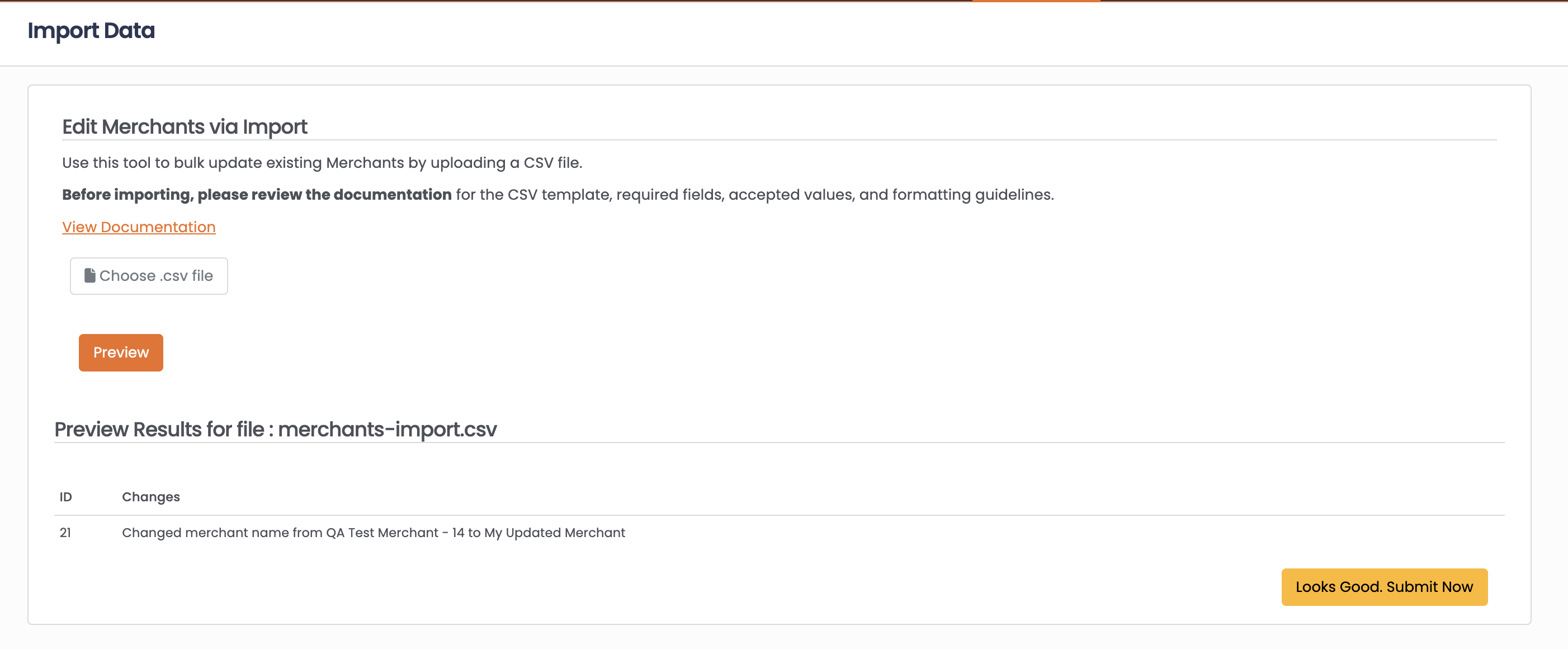
Click Preview to review the changes
-
Click Looks Good Submit Now to apply updates
Common Use Cases
Bulk update billing descriptors:
Include only Merchant ID and Merchant Descriptor columns to update descriptors across multiple merchants.
Update processing limits:
Use Merchant ID, Processing Limit (USD), and Enforce Processing Limit to adjust limits in bulk.
Change BIN block profiles:
Update Initial Bin Block Profile or Rebill Bin Block Profile across merchants.
FAQ
Q: How do I find merchant IDs?
A: Merchant IDs are displayed in the Merchants list and on individual merchant records.
Q: Can I create new merchants via import?
A: No, merchant import only updates existing records. New merchants must be created through the Merchants interface.
Q: What format should I use for currency fields?
A: Use the currency ID from the CRM, not the currency code (e.g., use the ID, not "USD").
Updated 8 months ago